Unpaid move-ins: auto-cancel no-pay bookings after 7 days

The contract is signed and check-in day arrives - but the deposit and the first month's rent never do. Unpaid move-ins are one of the costliest problems in coliving and student housing: the room stays blocked on your calendar, hidden from new applicants, while your team sends one reminder after another. At €600 a month, a room held for three weeks by a booking that will never pay costs about €420 in lost rent.
VIVIN's Auto-cancel Unpaid Move-ins puts a limit on that wait. You set a grace period after check-in; if nothing at all has been paid towards move-in by then, VIVIN cancels the booking and frees the dates. A morning email warns your team a few days earlier, while a phone call can still save the booking. It is built for coliving, student housing and mid-term rental operators who confirm bookings weeks before arrival.
Why unpaid move-ins cost more than late rent
- Blocked availability - the unit looks occupied on your booking engine and channels, so nobody else can book it.
- Debt that will never be collected - the unpaid deposit and rent inflate your debt figures.
- Chasing time - three to five reminders and calls per case.
- Nobody owns the decision - cancelling feels drastic, so the booking lingers while everyone waits for "one more day".
For a 120-room coliving operator with two or three of these cases a month, that adds up to 4-8 weeks of blocked room time every month. Careful tenant screening lowers the risk, but some bookings always slip through.
How to auto-cancel unpaid move-ins in VIVIN
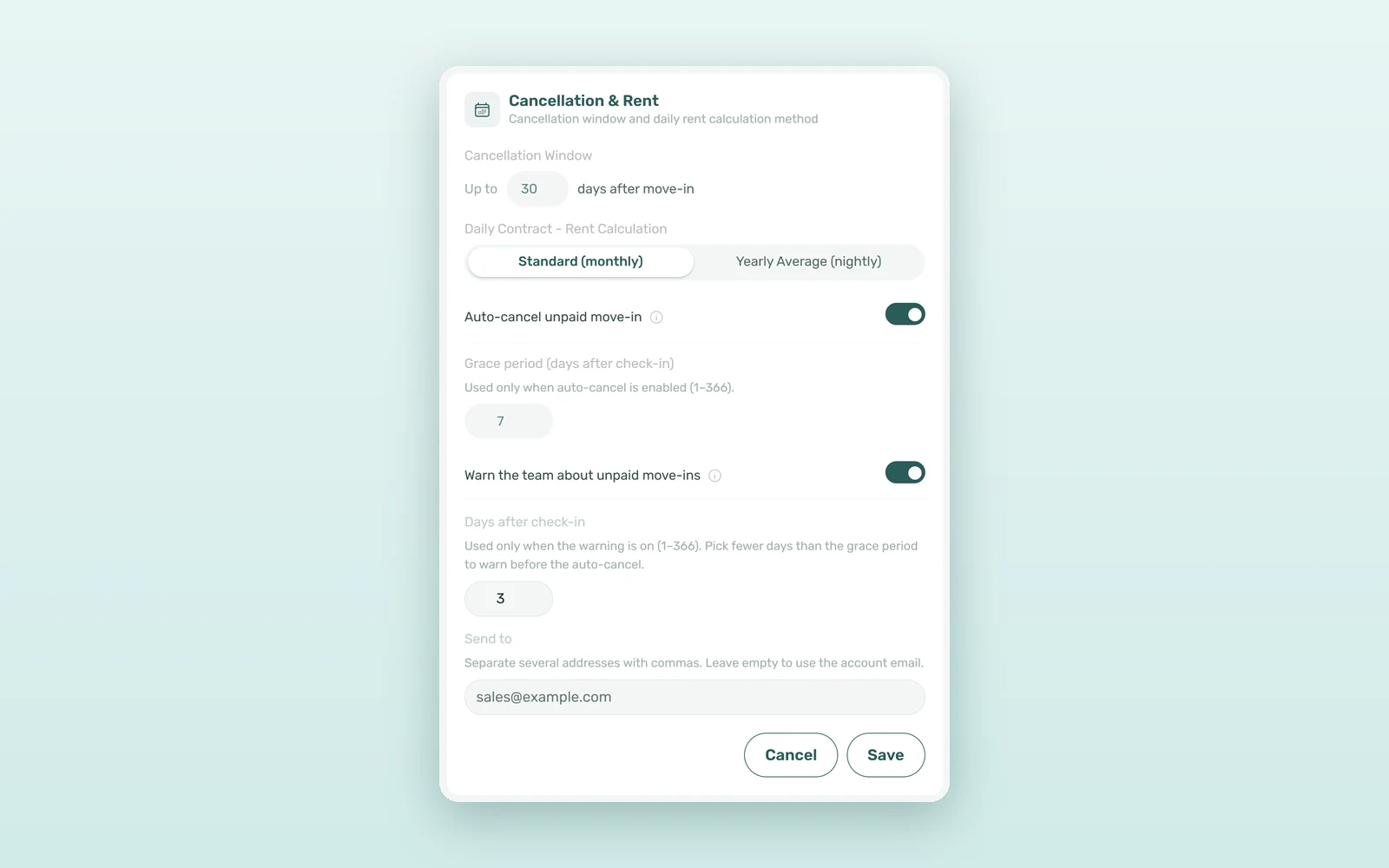
Both safeguards sit on one card, Settings > Global Settings > Cancellation & Rent, next to the rest of VIVIN's rent collection and payment tools. Each is off by default and turns on separately.
1. VIVIN knows which payments count for move-in
Move-in payments are the charges you require before a tenant moves in: the deposit and the first (or last) rent according to your move-in requirements, the admin fee, the cleaning fee when it is due at move-in, and any charge due on or before check-in. VIVIN marks them from your payment settings.
2. A morning warning for your team
Turn on Warn the team about unpaid move-ins and choose the Days after check-in (3 by default). Each morning, one email lists the tenants whose move-in payments are still unpaid after that many days - nothing paid or only part paid - and each booking appears only once. In Send to, list the recipients or leave it empty for the account email. The tenant receives nothing.
3. Automatic cancellation after the grace period
Turn on Auto-cancel unpaid move-in and set the Grace period (days after check-in), from 1 to 366 days (7 by default). VIVIN runs the check once a day. When the grace period has passed and every move-in payment is still fully unpaid, the booking is cancelled without refund, its unpaid charges are removed, and the dates go back on sale on your booking engine and channels.
4. A partial payment always goes to a person
Auto-cancel only acts when nothing has been paid. If the tenant has paid part of the move-in - the deposit but not the first rent, for example - the booking stays and your team gets a one-time email flagging it. VIVIN never removes a charge that has already been invoiced: if one is involved, the booking is left for your team. Every automatic cancellation is reported to your team by email.
How to chase the debt that is left
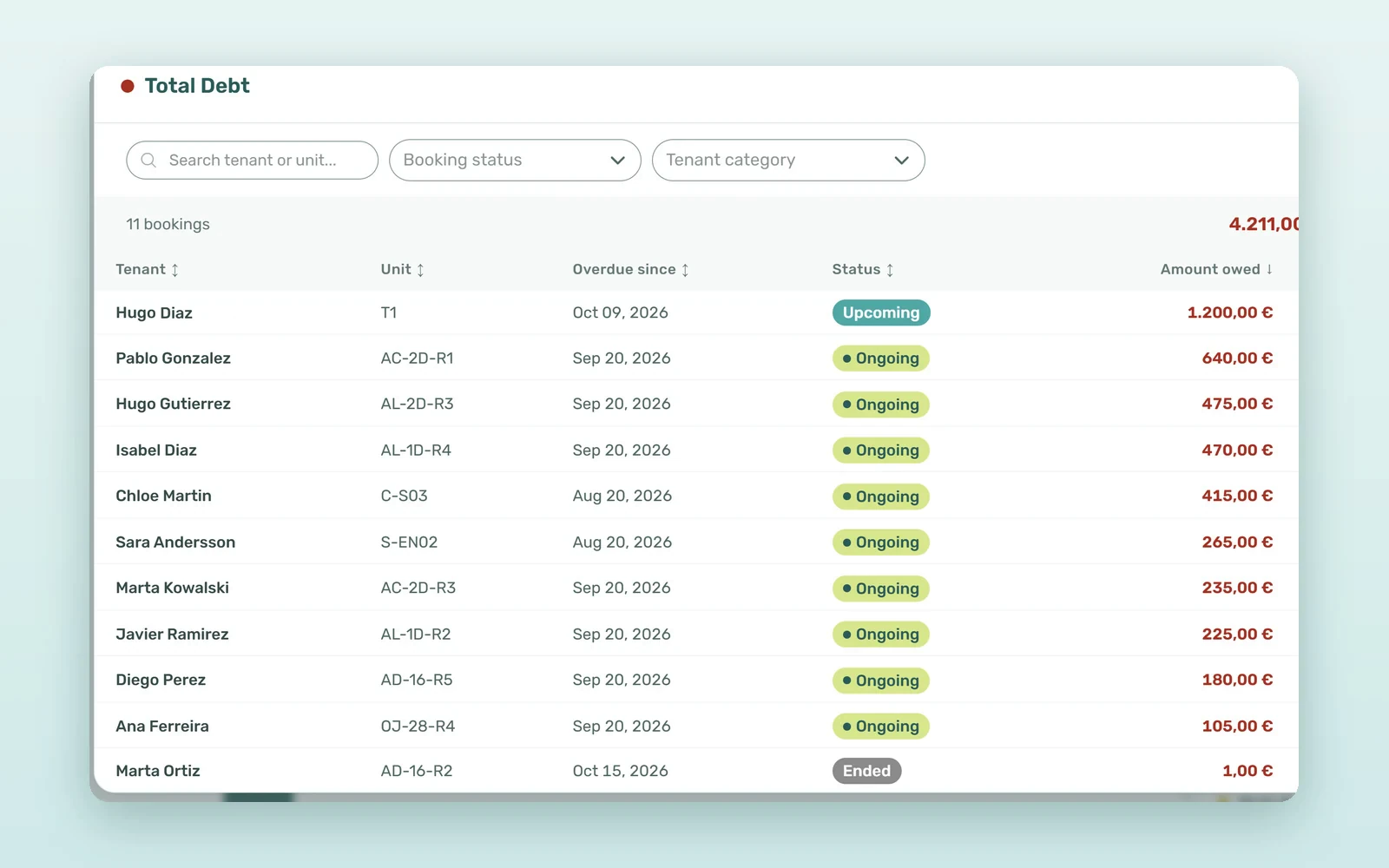
For everything else, the Total Debt card on Finance > Overview opens every booking in debt, with Overdue since and Amount owed. Search by tenant or unit, narrow it by Booking status, Booking category or Tenant category, and click a row to open the booking. For the follow-up itself, our guide to rent collection strategies covers the reminders and calls that work.
What unpaid move-ins cost: the numbers
An illustrative estimate for a 120-room operator with an average rent of €600 (about €20 a day) and three unpaid move-ins a month:
| Metric | Manual follow-up | With VIVIN |
|---|---|---|
| Days a no-pay booking blocks the room | 14-30 | 7 (your grace period) |
| Lost rent per case | €280-600 | €140 |
| When the team finds out | When someone notices | Email on day 3 |
| Chasing time per case | 1-2 hours | 15-30 minutes |
| Monthly cost (3 cases) | €840-1,800 + 3-6 hours | €420 + about 1 hour |
That is roughly €400-1,400 a month of rent you can sell again, plus several hours of chasing.
Unpaid move-in scenarios: no-shows and partial payers
The no-show
A booking starts on 1 September and nothing is ever paid. On the 4th, the morning email lists the tenant; your team calls and gets no answer. When the 7-day grace period has passed, VIVIN cancels the booking without refund and the room can be booked again the same day.
The partial payer
The tenant pays the €600 deposit but not the first rent. The booking is not cancelled: the morning warning shows it as part paid, and your team gets a one-time email so someone agrees a payment date with the tenant.
How to set up move-in protection
- Open the card - go to Settings > Global Settings and edit Cancellation & Rent.
- Turn on the warning - enable Warn the team about unpaid move-ins, then pick the days and the recipients.
- Turn on auto-cancel - enable Auto-cancel unpaid move-in with a grace period longer than the warning, for example 3 and 7 days.
- Write the tenant email - add an Auto-cancellation rule in Settings > Emails if tenants should be told.
- Review debt weekly - use the Total Debt list for the cases that need a person.
Frequently asked questions
What happens when a tenant does not pay the move-in?
With Auto-cancel unpaid move-in on, VIVIN checks every day. Once the grace period after check-in has passed and every move-in payment is still fully unpaid, the booking is cancelled without refund, its unpaid charges are removed and the dates go back on sale. Your team receives an email about each automatic cancellation.
Does a partial payment stop the automatic cancellation?
Yes. Auto-cancel only cancels bookings whose move-in payments are all still fully unpaid. A single partial payment, such as the deposit alone, keeps the booking. VIVIN then sends your team a one-time email, and the morning warning lists the booking as part paid until the move-in is settled.
Is the tenant told when the booking is cancelled?
Only if you create a rule with the Auto-cancellation trigger in Settings > Emails > Communication Rules. It sends your own template on the day VIVIN cancels the booking and never fires for a cancellation made by hand. The morning unpaid move-in warning goes to your team only, never to the tenant.
How long should the grace period be after check-in?
Many operators choose 5-10 days: long enough for a slow international bank transfer, short enough to let the room again within the month. Set the team warning a few days earlier, for example on day 3, so someone can call the tenant before the auto-cancel acts. The setting accepts 1 to 366 days.
A booking that never pays should not hold a room for a month. Set the rule once, let VIVIN warn your team and free the dates on time, and spend your follow-up on the tenants who intend to stay. Book a demo to see move-in protection on your own portfolio.


