Rental availability calendar: every unit on one timeline

A lead writes on a Tuesday afternoon: a room from 1 September to 30 June, ideally in one of your Lisbon buildings. With 150 units, answering means opening the bookings list, the channel calendars and a spreadsheet of manual blocks, then checking unit by unit. It takes 15-30 minutes, the lead has already asked two other operators, and every day a €600 room stays empty costs you about €20. What you need is a rental availability calendar that shows every unit at once.
VIVIN's Multicalendar is that screen, built for coliving, student housing and mid-term operators. Every unit is a row, every stay is a bar, and the availability searches tell you in seconds which rooms are free today, for a set of dates, or from a given day on.
Why checking room availability by hand is so slow
Availability lives in more places than most teams admit: mid-term bookings from portals, your booking engine or created by hand; Airbnb and Booking.com stays filling the gaps; manual blocks for renovations or owner use; and the preparation days after every check-out. When these sit in different tools, every enquiry becomes a small investigation. A team handling 20-40 availability questions a week can easily spend 20-40 hours a month on them, and a room that is free but nobody spotted stays empty for longer.
How VIVIN's rental availability calendar works
Open Sales > Multicalendar. The timeline reads the same bookings and blocks as the rest of VIVIN, so it never goes out of date.
1. Every unit and every stay on one timeline
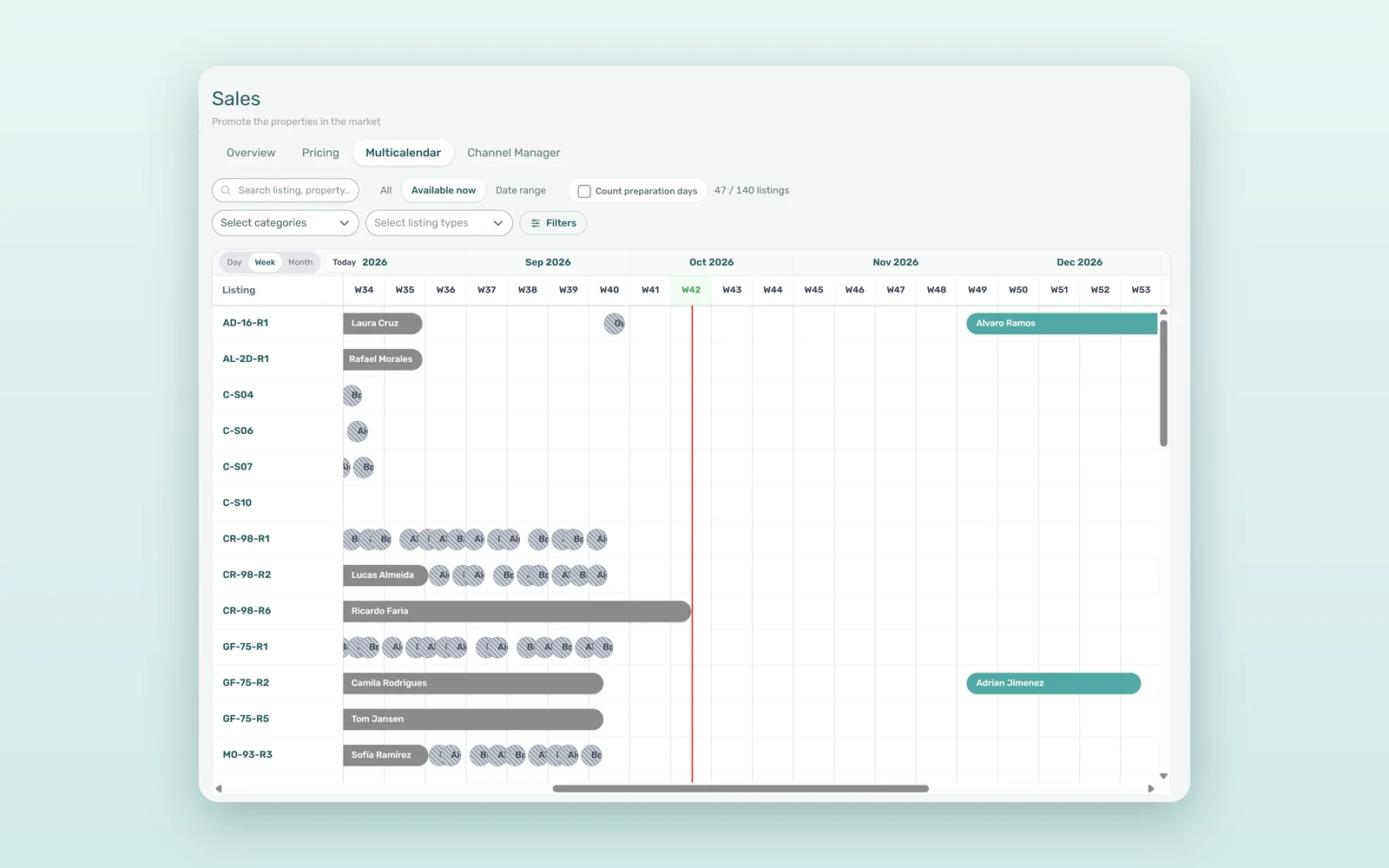
Each unit is a row, sorted by property. Bars show bookings with the tenant's name, manual blocks and short stays from Airbnb and Booking.com, synced through the native Airbnb and Booking.com channel manager. Switch between Day, Week and Month. Hover a bar for the dates, the tenant and the booking value (the stay total for short stays, the monthly rent from 30 nights), and click it to open the booking without leaving Sales.
2. Available now and Date range
Three buttons sit above the timeline: All, Available now and Date range. Available now keeps only the units free today. Date range keeps the units free on every day between a start and an end date, and the timeline jumps to the start. Leave the end date empty and the search finds the units free from that day on.
3. Preparation days, counted your way
During an availability search, a Count preparation days box appears. Ticked, the default, a unit stays occupied until its preparation days after a check-out are over; untick it to see the unit as free from the real check-out date. Booking on those days still needs Ignore unit preparation days.
4. Manual blocks: one rule for the account, one for you
Whether a unit with only a manual block counts as free is the Vacant Unit Preference, set for the account in Settings > Global Settings > Booking Defaults. Each user can override it in Settings > Personal Settings with Default or Include manual blocks, so sales can treat blocked rooms as sellable while finance keeps them out of the count.
5. Filters that travel with you
Search by unit, listing type, property name or address, then narrow with Select categories, Select listing types and Other filters (properties and number of rooms). The filters are shared with the Pricing tab, which adds a Min rent / Max rent range, and they are saved in the page address: a colleague who opens your link sees the same view.
6. On the phone, straight to what is free
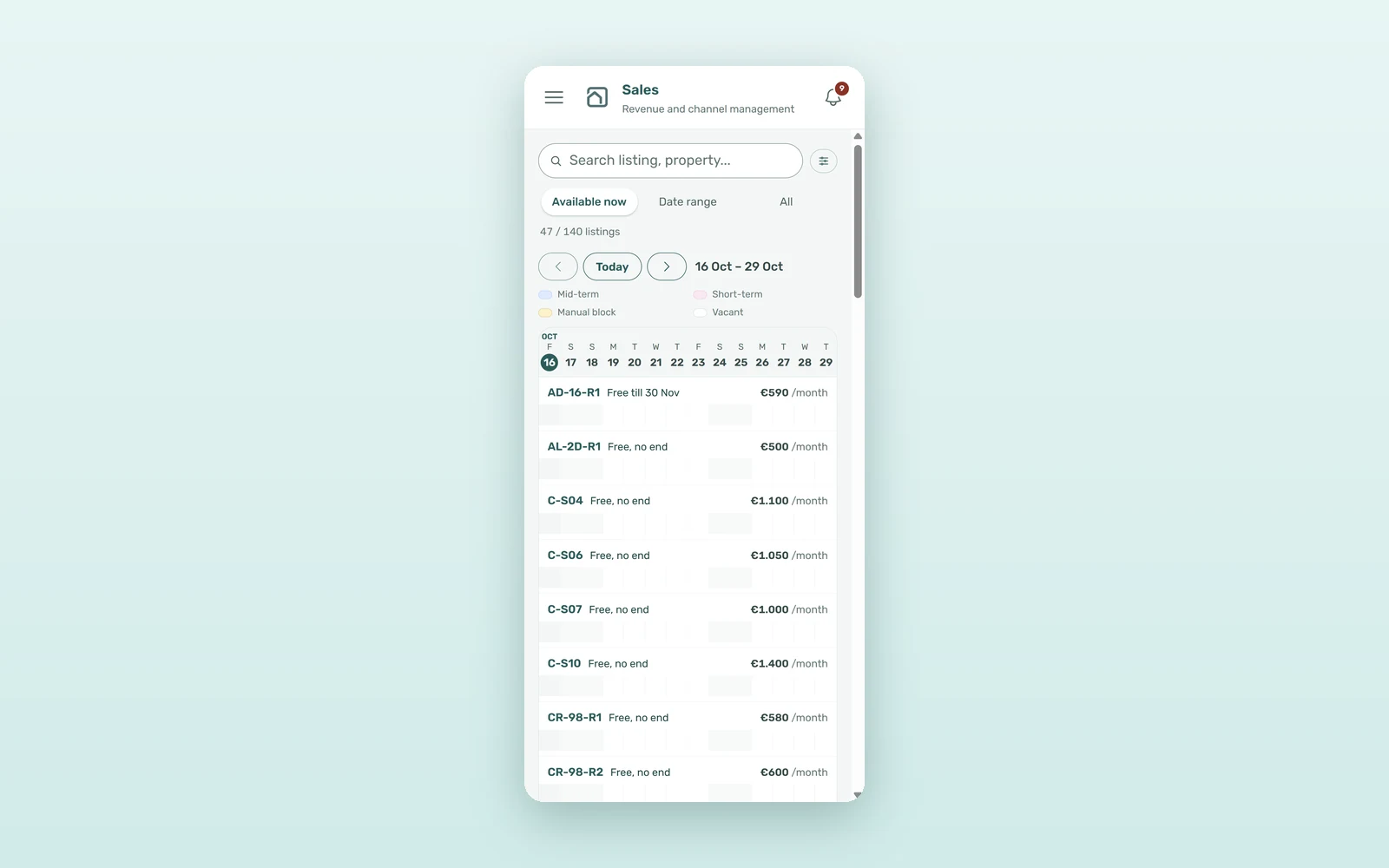
On a phone, Sales opens on the Multicalendar with Available now selected. Each unit shows Free till a date, Free tonight or Free, no end, with its monthly rent above the next two weeks of stays.
How much time does a rental availability calendar save?
An illustrative estimate for a 150-unit operator answering about 120 availability enquiries a month, with an average rent of €600 (about €20 a day) and six re-lets a month:
| Metric | Checking by hand | With the Multicalendar |
|---|---|---|
| Time to answer one enquiry | 15-30 minutes | 1-2 minutes |
| Team time per month | 30-60 hours | 2-4 hours |
| Days a freed room waits before it is offered | 3-7 | 0-2 |
| Lost rent per re-let | €60-140 | €0-40 |
| Monthly cost (6 re-lets) | €360-840 + 30-60 hours | €0-240 + 2-4 hours |
That is roughly €300-600 a month of rent and more than 25 hours of team time back. It is the same logic as multi-channel distribution to maximize occupancy: the sooner a free room is seen, the sooner it is let.
Multi-calendar use cases for coliving and student housing
The last-minute enquiry
On Thursday, a professional asks for a room from Monday for three months. Date range shows four free units. Unticking Count preparation days reveals a fifth that checks out on Saturday; the cleaning will be done on Sunday, so your team books it with Ignore unit preparation days.
The academic year
In May, a university asks for twelve rooms from 1 September, with no end date yet. A date range with only a start date lists the units free from 1 September onwards, and Select categories narrows it to the student buildings. See how VIVIN supports student housing operators.
How to set up the Multicalendar in five steps
- Open Sales > Multicalendar and pick Day, Week or Month.
- Choose Available now, or Date range with a start date.
- Decide whether this search should Count preparation days.
- If needed, set your own Vacant Unit Preference in Settings > Personal Settings.
- Narrow with categories, listing types and Other filters, then share the link.
Explore the full multi-calendar for rental portfolios, or book a demo to see it on your own units.
Frequently asked questions
What is a multi-calendar in property management?
A multi-calendar shows the availability of many units on one timeline instead of one calendar per unit. In VIVIN, each unit is a row and each booking, short stay or manual block is a bar, so you can see at a glance which rooms are free, when they free up and for how long.
How do I find rooms that are free from a specific date?
In Sales > Multicalendar, choose Date range and enter only a start date. VIVIN lists the units with no booking or block on that day or on any later day, which is exactly what you need for an academic year or an open-ended stay. Add an end date to search a fixed period instead.
Do preparation days count as occupied?
By default, yes: a unit stays occupied until its preparation days after a check-out are over. Untick Count preparation days to see units as free from the real check-out date. New bookings on those days stay blocked unless someone ticks Ignore unit preparation days when creating the booking.
Can I check room availability on my phone?
Yes. On a phone, Sales opens directly on the Multicalendar with Available now selected. Each unit shows until when it is free and its monthly rent, above its next two weeks of stays, and you can move two weeks at a time or search by dates during a viewing.
One timeline, no guesswork. When every unit, stay and block sits on the same screen, "is it free?" stops being a research task and becomes a click.