Property management invoicing: VAT per owner and 3 connectors

A portfolio with several owners rarely has a single invoicing rule. One owner is a company that charges VAT on cleaning; another is a private landlord whose rent is exempt. Your management company needs its own series, and your accountant wants every PDF filed by owner at the end of the quarter. Done by hand, property management invoicing means switching programs, typing amounts twice and keeping a spreadsheet of tax codes. At 2-3 minutes per document, 400 documents a month is 13-20 hours of work.
VIVIN's Invoicing Connections handle that variety in one place: VIVIN's own invoicing with your numbering, connectors for the tools you already use, routing by owner or payment type, and VAT set per owner. It is built for operators who invoice for several owners - coliving groups, student housing and mid-term rental managers. New to automation? Start with why automated invoicing saves hours.
Why property management invoicing gets messy as you grow
- One tool, many issuers - different owners, different VAT regimes, sometimes different invoicing systems.
- Tax codes from memory - rent, deposits, cleaning and extras each need the right rate and product code.
- Corrections done the wrong way - editing an issued invoice instead of correcting it with a credit note.
- Filing - downloading PDFs one by one into a folder for each owner.
How property management invoicing works in VIVIN
Invoicing is part of VIVIN's payments and invoicing tools: you set it up once in Settings and run it from Finance.
1. VIVIN Invoicing: your own numbering
Add the VIVIN Invoicing card in Settings > Integrations - there is nothing to connect - and click Configure. Fill in the Issuer details, set the Invoice series, Proforma series and Credit note series, create your Tax rates and upload a Word template for each document. The Number format combines series, year and number, so it can produce F.2026/453 or F0453-26. Numbers are assigned without gaps, and the format locks once the first document is issued.
2. Connectors for the tools you already use
- Invoice Express - connect with your API ID and API key. VIVIN also issues proformas automatically when charges fall due.
- Hostkit - each listing uses its own property's API key, set under Listing keys, with your Hostkit invoice series in Settings > Invoicing.
- NetSuite - connected with OAuth credentials and configured with invoice defaults, the SII identification type map and a class code per property.
Invoice Express and Hostkit each run on their own. VIVIN Invoicing and NetSuite can run side by side, and more than once.
3. Several connections, routed by filters
With VIVIN Invoicing and NetSuite, the first connection is the catch-all. Each one you add filters on Payment types, Owners or both; everything else falls back to the catch-all, which then shows a Fallback badge. Edit routing filters changes a filter later, for new invoices.
4. VAT set per owner
In Settings > Invoicing, Tax Codes set the account's tax, product code and description for each charge type: Rent, Installment, Cleaning Fee, Admin Fee, Exit Fee, Deposit and Others. Under VAT by owner, Give an owner its own VAT overrides them for one owner's properties, charge by charge, whichever provider issues the document.
5. Credit notes, never deletions
An issued invoice is a fiscal document, so VIVIN never deletes it. Edit an invoiced line's amount on the booking's Contract Values tab and VIVIN creates a credit note for the difference. Pending credit notes gather under Not issued credit note in Finance > Transactions, where Issue credit notes sends them to your provider in bulk.
6. Invoicing in bulk, filed by owner
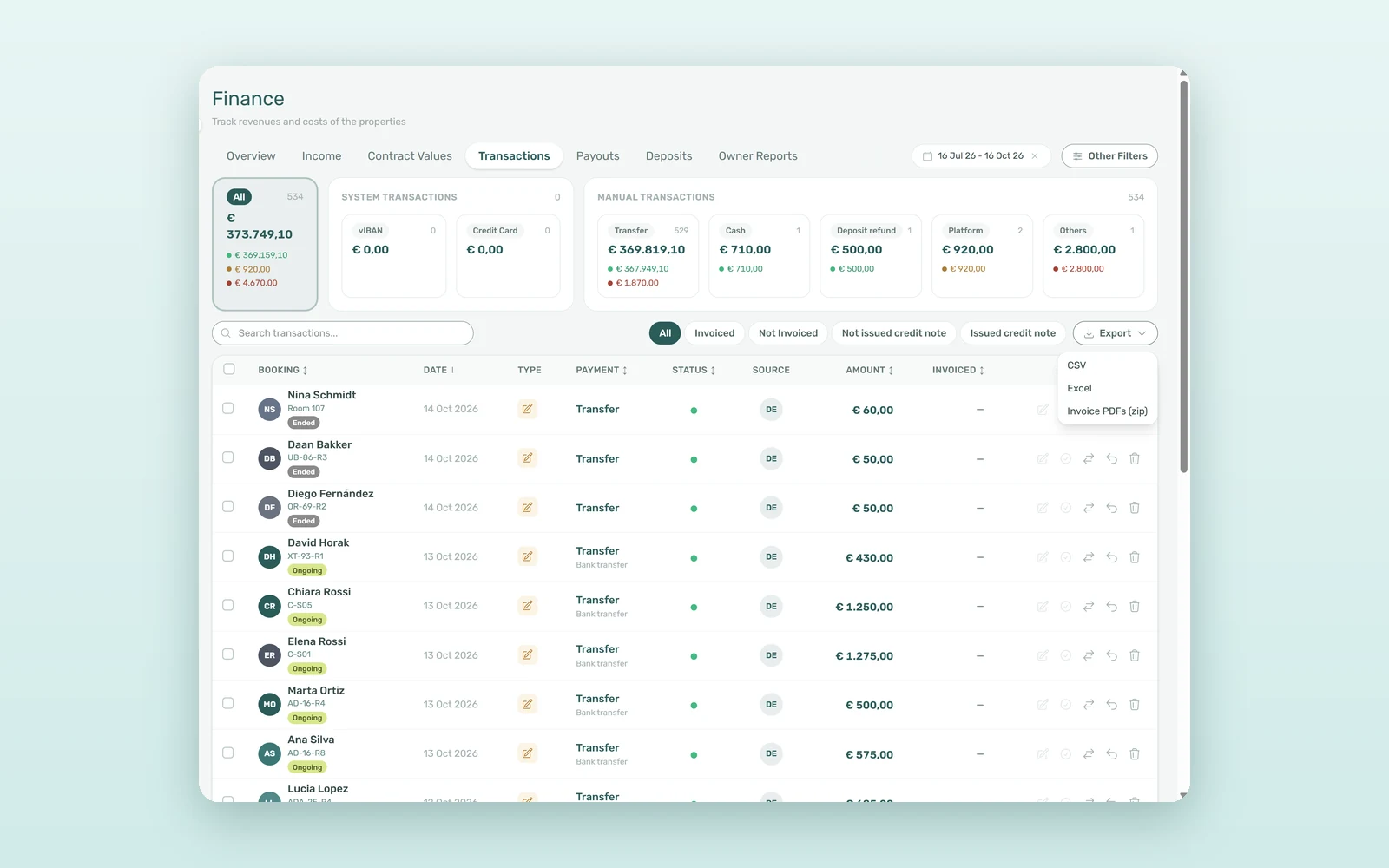
In Finance > Transactions, filter on Not Invoiced and use Invoice all allocations to issue them all. When the quarter closes, Export > Invoice PDFs (zip) downloads the issued invoices for the current filters in one zip, with one folder per property owner.
What 400 invoices a month cost by hand
An illustrative estimate for an operator with 250 rooms and 15 owners, issuing about 400 documents a month:
| Task | Manual | With VIVIN |
|---|---|---|
| Issuing the month's invoices | 13-20 hours | Bulk from Transactions, under 1 hour |
| Choosing the right VAT for each owner | From memory or a spreadsheet | Set once per owner |
| Filing PDFs by owner for the accountant | 2-3 hours a quarter | One zip, one folder per owner |
| Monthly total | 15-22 hours | 2-4 hours |
That is 12-18 hours a month back, and an audit trail where every correction is a credit note rather than a quiet edit.
Two invoicing setups for multi-owner portfolios
Two owners, two VAT regimes
Owner A's rooms are let with exempt rent; Owner B, a company, charges VAT on cleaning. Leave Owner A on the account's Tax Codes and give Owner B their own VAT for Cleaning Fee. Every invoice for Owner B's properties now carries that rate, whichever connection issues it.
Your company and an owner who invoices in their own name
Keep a catch-all VIVIN Invoicing connection with your company as issuer, and add a filtered connection for that owner with their issuer details and series. Their tenants' invoices go out in their name, and everything else stays with you. If you also settle that owner monthly, the management fee invoice goes out from the same setup.
How to connect and configure your invoicing provider
- Connect a provider - in Settings > Integrations, add VIVIN Invoicing, Invoice Express, Hostkit or NetSuite.
- Configure it - issuer, numbering, tax rates and templates for VIVIN Invoicing; keys or defaults for the others.
- Set your tax codes - in Settings > Invoicing, one row per charge type, then VAT by owner where needed.
- Add routing - extra VIVIN Invoicing or NetSuite connections, filtered by owner or payment type.
- Invoice and file - issue from Finance > Transactions, then export Invoice PDFs (zip) for your accountant.
Frequently asked questions
Can VIVIN issue invoices without an external invoicing program?
Yes. Add the VIVIN Invoicing card in Settings > Integrations and configure the issuer details, series, number format, tax rates and Word templates. It issues invoices, proformas and credit notes with gapless numbering. It suits operators who do not need certified invoicing software; where local rules require it, connect a certified provider instead.
How do you charge different VAT rates for different owners?
In Settings > Invoicing, set the account's Tax Codes per charge type, then use VAT by owner to give an owner their own tax for any charge or Others category. That owner's rate then applies to every invoice, proforma and credit note for their properties, whichever invoicing provider issues them.
How do you correct an invoice that was already issued?
With a credit note, never by deleting it. Edit the line's amount on the booking's Contract Values tab and VIVIN creates a credit note for the difference, which you issue from Finance > Transactions. Invoice Express and VIVIN Invoicing can credit part of an invoice; Hostkit and NetSuite credit the whole document.
Can you use more than one invoicing provider at the same time?
Yes, with VIVIN Invoicing and NetSuite: the first connection is the catch-all and each extra one filters by payment type, owner or both. Invoice Express and Hostkit each run on their own, so connecting one of them means it handles every invoice on the account.
One portfolio, many invoicing rules, one place to run them. Your numbering, each owner's VAT and every correction as a credit note. Book a demo to see it with your own owners and tax codes.