Multi-currency property management: run GBP and USD portfolios

Most rental software is built in one currency and "supports" others by swapping a symbol. That isn't multi-currency property management, and for an operator opening 40 rooms in London it's where the trouble starts: a rent typed as 950 that the contract prints as €950, owner reports with the wrong symbol and, worst of all, listings published on Airbnb in euros when you meant pounds. At an illustrative rate of €1.15 to the pound, a £950 room published as €950 is about 13% cheaper than you intended, every night.
VIVIN's Multi-Currency support lets an account run in EUR, GBP or USD from end to end: bookings, payments and payment plans, contracts, tenant emails, owner reports and the channel connection all speak the same currency. It's built for coliving, student housing and mid-term operators expanding into the UK or the US.
Why swapping the symbol isn't multi-currency property management
- Contracts - a typed "€" in a template, or an amount in words that says "euros", turns a valid lease into one that needs redoing.
- Channels - booking platforms fix a listing's currency when it's created, so a listing set up in the wrong one stays wrong.
- Totals - a dashboard that adds €39,000 and £38,000 and shows "77,000" is wrong in both currencies.
- History - if a setting change silently reinterprets last year's payments in a new currency, your finance history stops meaning anything.
How multi-currency property management works in VIVIN
1. Choose the account currency
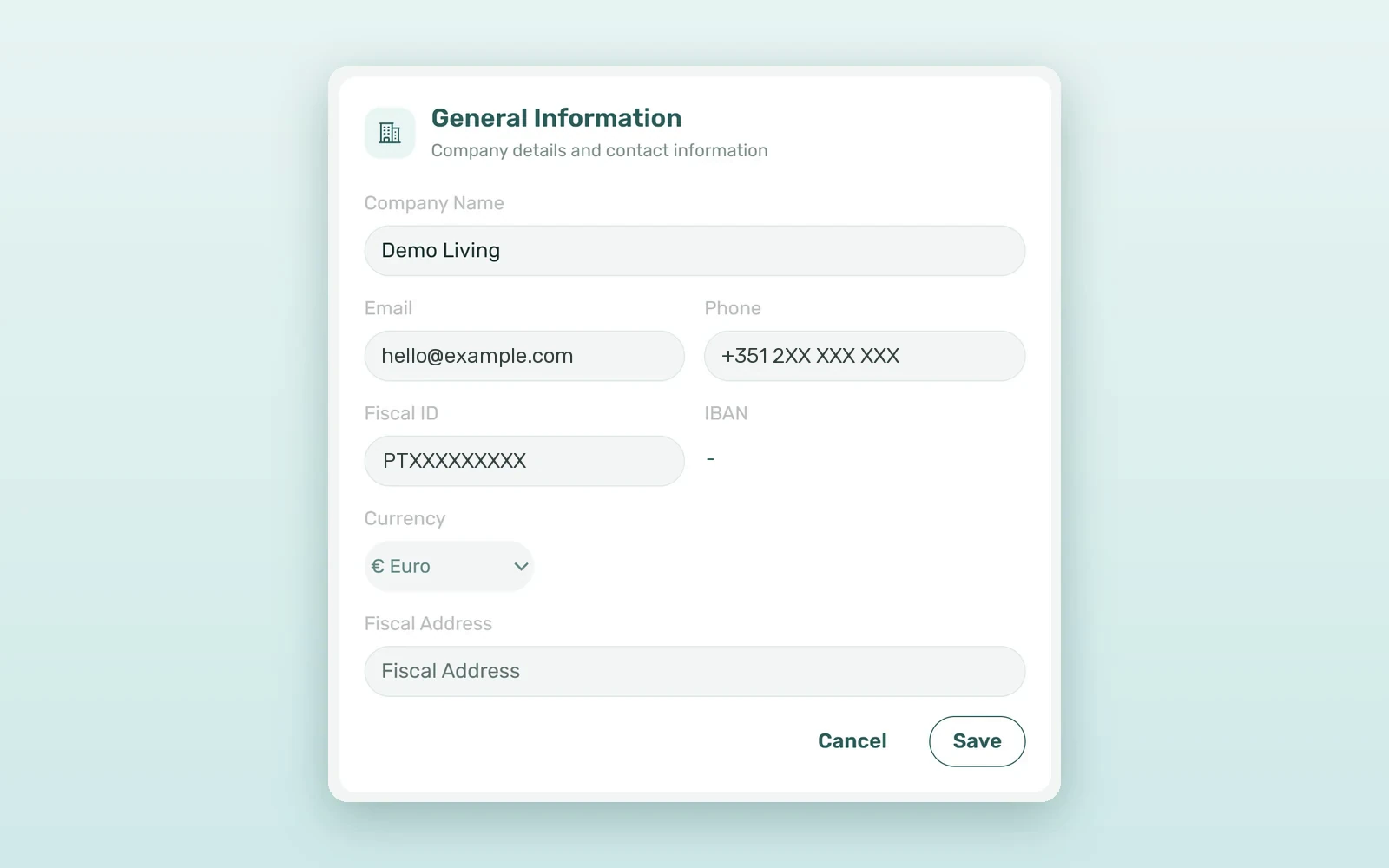
In Settings > Global Settings, edit the General Information card and pick a Currency: € Euro, £ British pound or $ US dollar. New money is created in that currency from then on. New accounts start in euros, and the field is available to anyone with permission to edit General Information.
2. Every amount carries its own currency
Each booking, payment-plan line, payment, payout, cash flow and owner report records the currency it was created in, and is always displayed in it - £1,234.50 or $1,234.50, not a euro figure with a different symbol. The tenant portal shows the booking's currency, the welcome, onboarding, check-out and portal-link emails use it, and Genius answers money questions in it.
3. Contracts that read right
Contract templates have {Currency} and {CurrencySymbol} variables, and amounts in words come out in pounds or dollars. If a template for a non-euro account still contains a typed € sign, VIVIN refuses to generate the contract and tells you why - so the mistake is caught before a tenant signs.
4. The channel connection in the same currency
When you connect units to Airbnb or Booking.com through VIVIN's native channel manager connection, the property and its rate plan are created in the account's currency. If other units of the same building were already published in a different currency, VIVIN stops and explains instead of mixing two currencies on one property.
5. A currency that can't drift
Once bookings, payment-plan lines, payments, payouts, cash flows, owner reports or tenant services exist, VIVIN refuses to switch the account to another currency and explains what's blocking it. That's deliberate: totals across Finance, Analytics, payouts and owner reports would otherwise add two currencies without converting them.
What to check before switching to GBP or USD
- One currency per account - there's no conversion and no mixing. A group with euro and pound portfolios runs each in its own account.
- Collection - card and virtual IBAN collection settle in euros only today, so on a GBP or USD account those methods aren't offered and payments are recorded manually.
- Invoicing - VIVIN's own invoicing and the NetSuite connector issue documents in pounds and dollars; euro-only connections such as InvoiceXpress and Hostkit won't issue for a non-euro account.
- Timing - pick the currency before the first booking, because after that it stays put.
EUR vs GBP: what mixing currencies really costs
Take a group with 60 rooms in Lisbon and 40 in London, at an illustrative rate of €1.15 per pound:
| Lisbon (EUR account) | London (GBP account) | |
|---|---|---|
| Rooms | 60 | 40 |
| Average monthly rent | €650 | £950 |
| Monthly rent roll | €39,000 | £38,000 |
| Naive single-currency total | "77,000" - neither euros nor pounds | |
| Real total, converted by your finance team | about €82,700 - the naive figure is 7% off | |
And on the channels: publishing the London rooms in euros instead of pounds would list a £950 room at €950, around £124 a month below plan per room, or roughly £59,500 a year across 40 rooms. Keeping each portfolio in its own currency, end to end, removes both mistakes at the source.
Who runs VIVIN in pounds or dollars
A London coliving operator
The account is set to pounds before the first booking. Contracts print pounds in figures and in words, tenants see pounds in their portal and emails, and listings go to the channels in GBP.
A US student housing pilot
A new account in US dollars runs a first building in the United States. Payment plans, owner reports and Analytics all read in dollars, and payments are recorded manually while card collection stays euro-only.
A European group expanding to the UK
The Lisbon portfolio stays in its euro account and the London one opens in its own pound account. Each team works in its own currency, and no screen ever adds the two together.
How to set up a GBP or USD account
- Decide the account's currency before you create the first booking.
- Go to Settings > Global Settings, edit General Information, choose the Currency and save.
- Check your contract templates and replace any typed € with {CurrencySymbol}.
- Pick an invoicing connection that supports your currency, such as VIVIN's own invoicing or NetSuite.
- Connect your units to the channels - listings are created in the account's currency. Planning a UK or US launch? Book a demo and we'll set it up with you.
Frequently asked questions
Can one VIVIN account use two currencies?
No. Each account runs in a single currency - EUR, GBP or USD - so every total adds like with like. A group with euro and pound portfolios runs them as two accounts, one per currency, and each team works in its own money from the first contract to the last owner report.
Does VIVIN convert between currencies?
No. VIVIN never converts amounts or applies exchange rates. Every booking, payment and payout keeps the currency it was created in, and totals never add two currencies together. If your group reports in a single currency, your finance team converts each account's totals at the rate it chooses.
Can I change my account currency later?
Only until money exists. Once bookings, payment-plan lines, payments, payouts, cash flows, owner reports or tenant services are recorded, VIVIN refuses the switch and explains what's blocking it. Before the first booking, you can change it freely in Settings > Global Settings > General Information.
Which invoicing connections work with GBP and USD?
VIVIN's own invoicing and NetSuite issue invoices, receipts and credit notes in pounds and dollars. Euro-only connections such as InvoiceXpress and Hostkit refuse to issue documents for a non-euro account, so set up a supported connection before you send your first GBP or USD invoice.
A currency is more than a symbol. With multi-currency property management in VIVIN, a UK or US portfolio runs in its own money from the first contract to the last owner report, and the numbers never quietly mix.