Annual rent increase: apply it to 150 bookings in minutes

Every year, the annual rent increase lands on the same desk. Your contracts allow an update of, say, 2-3%, and someone has to apply it to every eligible booking from the right month, without touching the ones already revised or about to end. For 150 bookings that's 150 payment plans edited by hand - typically 15-20 hours of careful work, with a real chance of a typo on a €650 rent. Where local rent caps or regulated rents apply, there's a second job: keeping the rent line under the cap while furnished-housing services are billed on their own.
VIVIN handles both from Settings > Payments. Rent Adjustment raises many bookings at once with a full preview before anything changes, and dual pricing keeps a Local Rent Cap on each unit. Both are part of VIVIN's property management software for coliving, student housing and mid-term operators, next to payments and payment plans.
Why manual rent increases go wrong
- Eligibility - filtering out cancelled stays, short-term guests and bookings already raised this year, usually in a spreadsheet.
- Every month, by hand - a 12-month booking has up to 12 rent lines, and each one is a chance to pick the wrong month or round differently.
- Interruptions - if the job stops halfway, nobody knows which bookings were raised, and raising twice is worse than not raising at all.
- Capped units - splitting each month into capped rent and services by hand doubles the work.
How to apply an annual rent increase to many bookings at once
1. Set the increase
In Settings > Payments, open the Rent adjustment card and click Review and apply. Enter the Increase percentage (2.5, for example) and pick the Effective month and Effective year - next month by default. If you choose a past month, VIVIN warns you that, for months already paid, the increase becomes an amount the tenant owes.
2. Review what changes
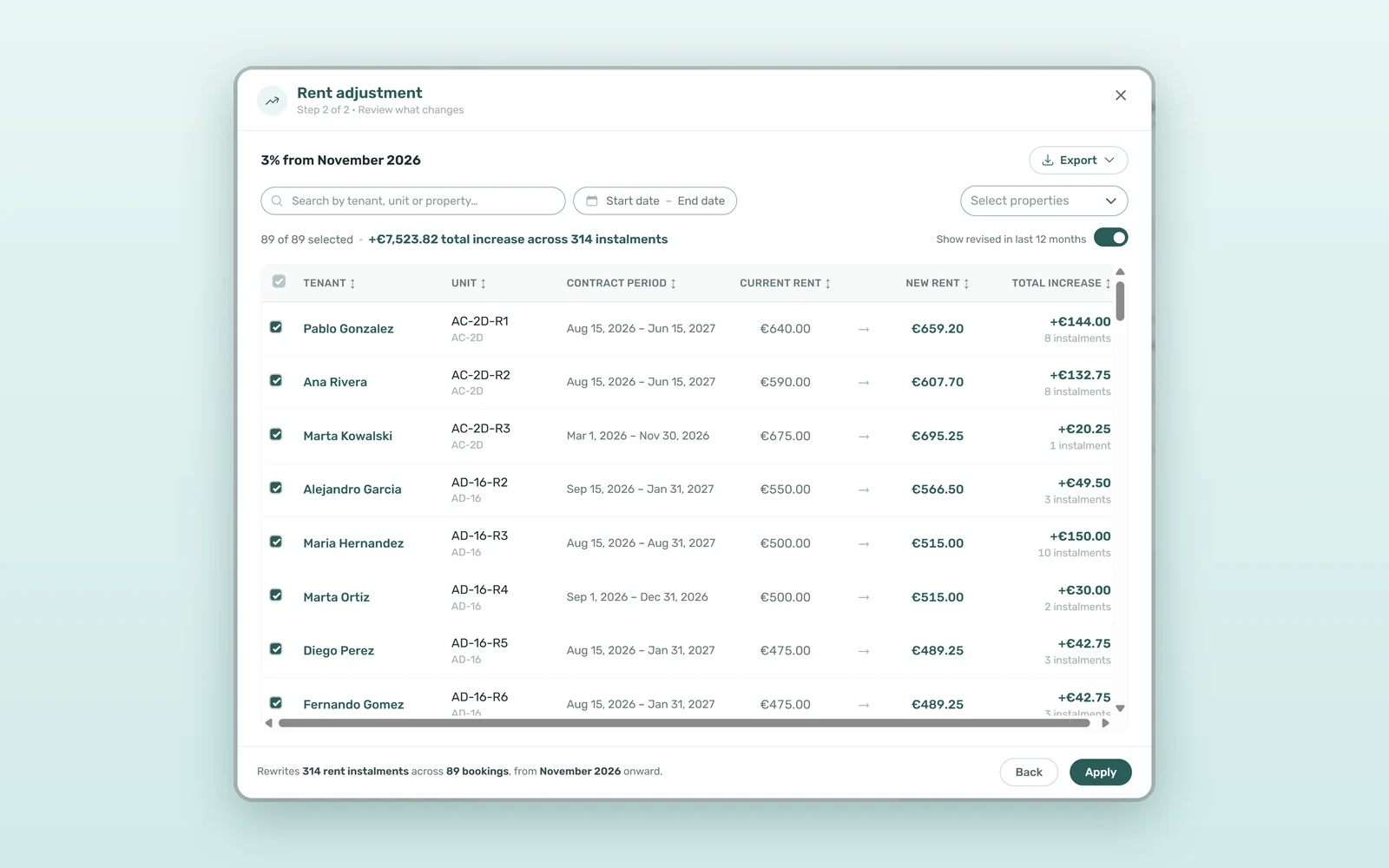
Preview lists every eligible booking with Tenant, Unit, Contract period, Current rent, New rent and Total increase. Search, filter by dates, categories or properties, and untick anything that should stay as it is. Bookings already revised with this tool in the last 12 months are tagged and left unticked. Export saves the list to CSV or Excel before you commit.
3. Apply it safely
Click Apply and confirm. Each booking is updated all or nothing, and every line is checked against the preview first: a booking edited in the meantime is reported as changed since preview and left untouched. Running the same increase twice never doubles it - those bookings come back as already applied - and Retry re-sends only what failed.
4. What's left out automatically
Cancelled or archived bookings, short-term Airbnb and Booking.com stays, bookings that pay rent in installments, bookings with invoicing in progress and bookings on dual pricing are skipped. Rent lines are rounded to the cent, each booking's change log records the adjustment, and unit prices and issued invoices stay as they are.
How to handle a rent cap with dual pricing
In Settings > Payments, the Dual pricing card has Dual pricing enabled and an Others category for the amount above the cap - "Services", for example. Each unit then gets a Local Rent Cap next to its Rent value, in the unit editor's Setup tab under Rent pricing. On new bookings, every monthly Rent line stops at the cap and the difference goes on an Others line with the same due date: a €700 rent capped at €520 becomes €520 of rent plus €180 of services, and the tenant's total doesn't change. Contract templates print both amounts with {LocalRentCap} and {RentCapDifference}, the same way automated rental contracts fill every other variable. Rules vary by market: our guide to rental regulations and compliance is a starting point, and your legal advisor has the final word.
What a 2.5% annual rent increase is worth
Take 150 bookings with an average rent of €650:
| Step | By hand | With VIVIN |
|---|---|---|
| Find eligible bookings | 2-3 hours | Automatic, with exclusions |
| Update 150 payment plans | 12-15 hours | One Apply, with a progress bar |
| Check the result | 1-2 hours | Preview and export before applying |
| Recover from an interruption | Risk of raising twice | Retry only what failed |
| Total time | 15-20 hours | 15-30 minutes |
And the money: 150 × €650 × 2.5% is €2,437.50 more rent a month, or about €19,500 if the bookings have eight months left to run - collected only if the increase lands on every eligible booking, in the right month.
Rent indexation in practice: two examples
The January indexation
Set the contractual percentage from January, untick the bookings that end in February, export the list for the finance file and apply. Next year, the bookings raised this time show up as revised and stay out unless you choose otherwise.
A new building with capped rents
Turn on dual pricing, pick the services category and enter each unit's Local Rent Cap as you create it. Every new booking is split from day one, and the contract prints both amounts.
How to set up Rent adjustment and dual pricing
- Check that your role has Bulk Rent Increase in Settings > Users > Role Permissions - admins have it by default.
- For capped units, turn on Dual pricing, choose the Others category and set each unit's Local Rent Cap.
- Open Settings > Payments > Rent adjustment, enter the percentage and month, and click Preview.
- Filter, untick and export, then click Apply and retry anything that failed.
- Send tenants their rent update notice. Want to see it on your own portfolio first? Book a demo.
Frequently asked questions
Does VIVIN notify tenants about a rent increase?
No. Rent adjustment updates each booking's payment plan and records the change in its change log, but it doesn't email tenants. Send the notice your contracts and local rules require before the effective month, so tenants see the new amount in their portal without any surprise.
Can I undo a bulk rent increase?
Not in one click: the confirmation step warns that applying cannot be undone. That's why the preview matters - review the list, untick the exceptions and export it before you press Apply. If one booking needs a different amount afterwards, correct that booking's payment plan on its own.
What happens to months that were already paid or invoiced?
Every rent line from the effective month onwards is raised, including months already paid, and the difference becomes an amount the tenant owes. Issued invoices are not changed. If you pick a month in the past, VIVIN warns you first, and bookings with invoicing in progress are skipped.
What is a Local Rent Cap?
It's the highest amount a unit can bill as rent where local rent caps or regulated rents apply. With dual pricing on, VIVIN bills each month's rent up to the cap and puts the difference on a separate services line, so the tenant's total monthly amount stays exactly the same.
An annual rent increase shouldn't take a week of copy and paste. With Rent Adjustment and dual pricing, you set the rule once, see every booking it touches and apply it in minutes - capped rents included.