Security deposit management: 7 statuses from payment to refund

A tenant moves out on a Friday; by Monday they are asking when their €1,000 security deposit will be back. Somebody checks the contract for the return term, somebody else checks whether the last utility bill has been charged, and nobody is sure whether the broken desk is still being discussed. Multiply that by 20-40 check-outs in a busy September and deposits become one of the most stressful parts of the year for coliving and student housing teams.
VIVIN's Deposit Lifecycle gives every security deposit a status, a due date and a clear next step, from the first payment to the refund. Everything sits in Finance > Deposits and on each booking's Deposit tab, alongside VIVIN's other rent and deposit payment tools.
Why security deposit refunds go wrong
- No single list - deposits sit across bookings, bank statements and spreadsheets.
- Unclear deadlines - the return term depends on the contract, and sometimes on the individual booking.
- Refunds made too early - the money goes back before the final utility bill or a damage claim is settled.
- Arithmetic by hand - deposit paid, minus unpaid rent and charges, plus any overpayment.
A thorough move-in and move-out inspection settles what was damaged. The rest is bookkeeping, and that is where VIVIN takes over.
How security deposit management works in VIVIN
1. Seven statuses, updated from real payments
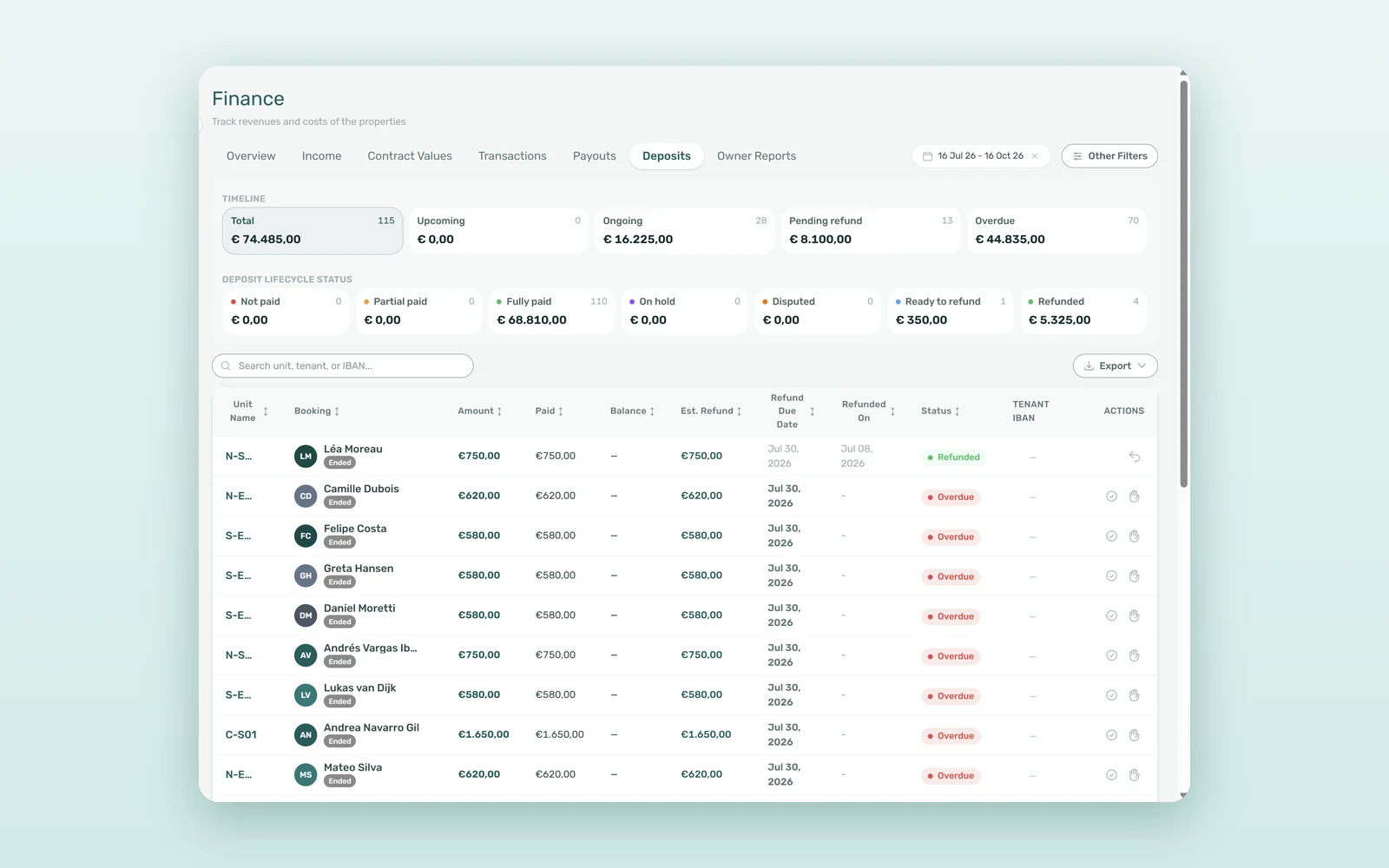
Each deposit carries one of seven statuses: Not paid, Partial paid, Fully paid, On hold, Disputed, Ready to refund and Refunded. The first three follow the money: as payments are allocated to the deposit, VIVIN moves it from Not paid to Fully paid on its own. Refunded is set the moment a refund is recorded, and the other three are decisions your team makes. Deposits that are never paid at all are handled by auto-cancelling unpaid move-ins.
2. A timeline you can work through
Finance > Deposits opens with two rows of cards. The Timeline row splits deposits into Total, Upcoming (before check-in), Ongoing, Pending refund (after check-out, up to the refund due date) and Overdue. The Deposit lifecycle status row shows the seven statuses, each with its count and amount. Click any card to filter the list, or search by unit, tenant or IBAN.
3. A refund due date on every booking
Each deposit gets a Refund Due Date: the contract end or check-out date, as chosen in Deposit Refund Limit Reference, plus the days in Deposit Refund Limit under Settings > Payments. A single booking can override the term, and sorting by due date puts the oldest refunds first.
4. Holds and disputes that stop mistakes
Put on hold keeps a deposit back while you wait for a final bill or check the room; refunding it asks Refund a deposit on hold? first, so nobody returns it by accident. Mark disputed, available once Enable deposit disputes is on in Global Settings, blocks any refund until someone clicks Resolve dispute.
5. An estimated refund that does the maths
Est. Refund shows what you would give back today: the deposit paid, minus any part already used to pay charges, plus the booking's Balance, which is negative when the tenant still owes money. It never goes below zero. A €1,000 deposit with a €45 final electricity bill charged to the booking returns €955. When you refund, the window shows each step: deposit paid, used to pay outstanding charges, overpayment returned on top and cash returned to the tenant.
6. A recorded refund, with its real date
VIVIN records the refund; you make the bank transfer to the Tenant IBAN shown on the row and click Mark refunded. If the deposit had been invoiced, the refund leaves a credit note to issue in Finance > Transactions, because an invoice is corrected with a credit note, never deleted.
How to set deposits by length of stay
In the property editor, a rent-based (Variable) security deposit can be set Per stay duration. Under Rents by stay length, each tier says how many rents are charged from a given day of stay - for example two rents for stays from day 0 and one rent from day 180. New bookings pick the right tier automatically.
What deposit tracking saves: a 150-room example
An illustrative estimate for an operator with 150 rooms, an average deposit of €1,000 and around 25 check-outs a month:
| Task | Manual | With VIVIN |
|---|---|---|
| Finding the deposits due this week | 30-60 min | One click on Pending refund |
| Working out each refund | 10-15 min | Est. Refund, already calculated |
| Refunds made before the final charges | 1-2 a month | Held or disputed first |
| Late refunds that trigger follow-ups | 5-8 a month | Overdue card, sorted by due date |
| Monthly time on deposits | 6-10 hours | 1-2 hours |
That is roughly 5-8 hours saved every month, and every euro of the €25,000 or so returned that month can be traced to a status, a date and a refund record.
How to set up deposit refunds
- Set the deadline - pick the Deposit Refund Limit Reference in Global Settings and the number of days in Settings > Payments.
- Choose your safeguards - in Global Settings > Charges & Payments, decide on Enable deposit disputes, Use the "Ready to refund" status and Allow refund before contract end.
- Open Finance > Deposits - start with Overdue, then Pending refund. The tab needs the Approve Payments permission.
- Refund and record - transfer to the Tenant IBAN, then click Mark refunded.
- Issue any credit notes - for deposits that had been invoiced, from Finance > Transactions.
Frequently asked questions
When does a security deposit have to be refunded?
In VIVIN, the Refund Due Date is the contract end or check-out date, as you choose in Deposit Refund Limit Reference, plus the days set in Deposit Refund Limit under Settings > Payments. A booking can override that term. Deposits past the date with no refund recorded appear under Overdue. Check the legal deadline in your country.
Can unpaid rent or damage be deducted from the deposit?
Yes. Charges you add to the booking before the refund, such as a repair or a final utility bill, and any unpaid rent are settled from the deposit when you record the refund. Est. Refund shows the result in advance and never goes below zero, and the refund window lists every step of the calculation.
Does VIVIN send the deposit back to the tenant automatically?
No. VIVIN records the refund but does not move money. Make the bank transfer to the Tenant IBAN shown on the row, then click Mark refunded and, on the booking's Deposit tab, set the refund date to the day the money left the bank. Revert refund undoes a refund recorded by mistake.
What is the difference between a deposit on hold and a disputed deposit?
On hold marks a deposit you are keeping back for now, for example while waiting for a final bill; it can still be refunded after a confirmation. Disputed, available once Enable deposit disputes is on, applies to a fully paid deposit and blocks any refund until someone on your team clicks Resolve dispute.
Every deposit, accounted for. A status for each one, a due date you can sort by and safeguards that keep money where it belongs until the last charge is settled. Book a demo to see deposit tracking on your own portfolio.


