Booking cancellation refunds: decided line by line in 4 steps

A tenant cancels three weeks before move-in. They paid a €600 deposit, a first month's rent of €600 and a €150 admin fee; your policy keeps the admin fee and returns the rest. In most tools, that booking cancellation refund means zeroing some lines, deleting others, reversing an invoice with a credit note, deciding what happens to the deposit and then checking that the booking does not still show a debt. One wrong click and the tenant's file says they owe you €750.
VIVIN's Cancellation Wizard turns that into four guided steps for coliving, student housing and mid-term operators: choose the refund method, settle the deposit, decide the refund line by line and confirm once. Nothing is saved until the last click, and then everything is applied together - or nothing is.
Why a booking cancellation refund goes wrong so often
- Lines changed one by one - each edit saves on its own, so a cancellation abandoned halfway leaves a mess.
- Invoiced money - an invoiced rent cannot simply be deleted; it needs a credit note, and someone has to remember.
- Partial refunds - "return the rent, keep the fees" has to become exact amounts on exact lines.
A tricky cancellation can take 30-60 minutes plus a second person to check it.
How to cancel a booking in VIVIN's four-step wizard
Open the booking, go to Contract Info and click Cancel Booking at the bottom. The wizard shows Step 1 of 4.
1. Choose the refund method
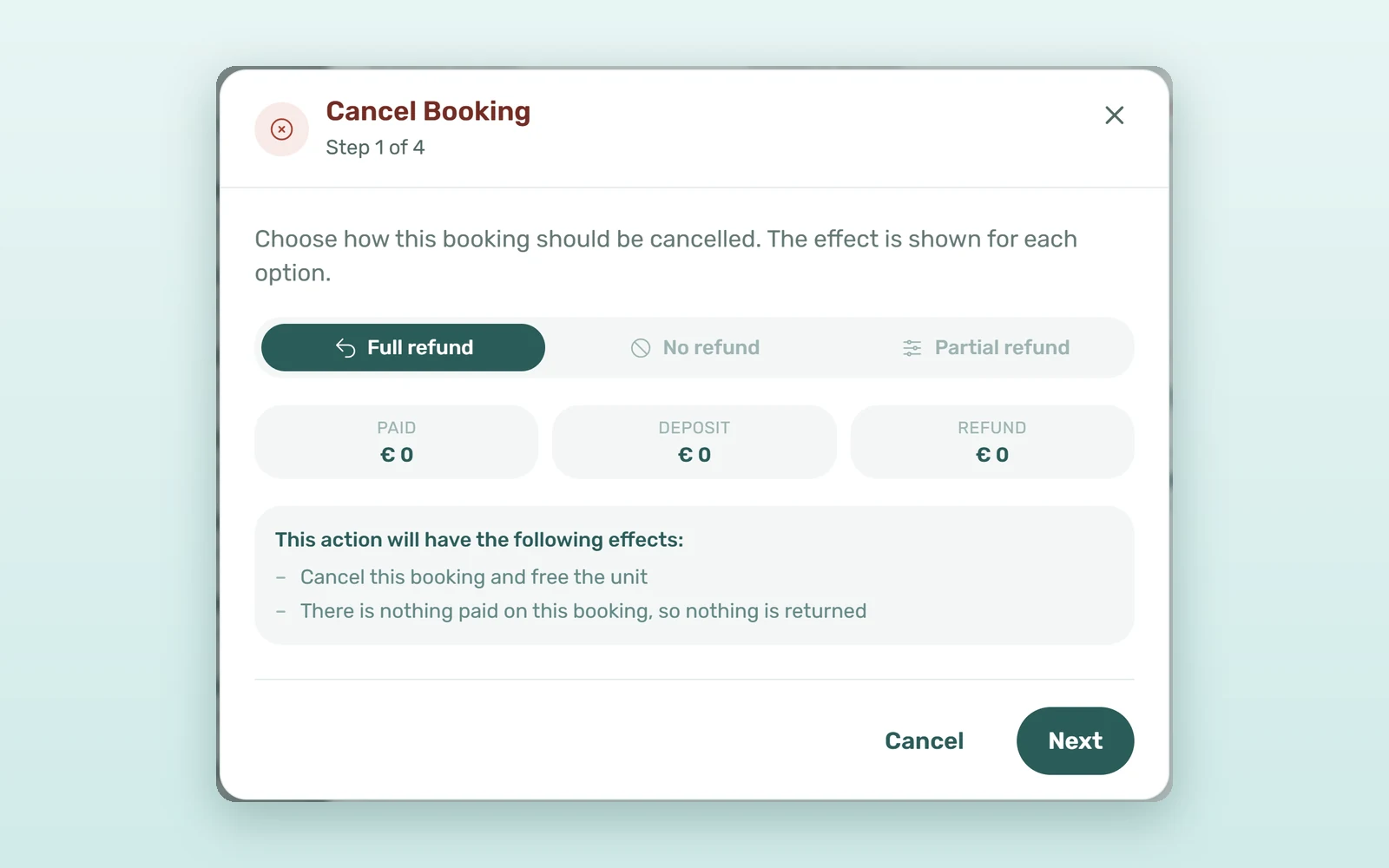
Pick Full refund, No refund or Partial refund. Three tiles show what the tenant has Paid, how much of the Deposit was paid and what this method will Refund, and This action will have the following effects: lists what will happen in plain words.
- Full refund - every line goes to zero and keeps its history; the money paid stays on the booking as an overpayment to return.
- No refund - lines still owed are deleted, paid lines are written down to what was paid, and you keep the money.
- Partial refund - as no refund, minus what you choose to return on each line.
2. Settle the deposit in its own step
Settle the deposit before cancelling shows each deposit line and what happens to it. With a full or partial refund, the deposit stays on the booking and is returned through the usual deposit flow. With no refund, it is reversed: money no document holds is set to zero, money on an issued invoice is reversed with a credit note, and the reversed amount pays what is still owed. With a partial refund and nothing to decide, the step is skipped.
3. Decide the refund line by line
Payment lines this cancellation acts on lists every line with its due date, amount, what was paid and its status, before and after, in the same order as Contract Values - oldest due date first. With a partial refund, a RETURN column takes what goes back on each paid line, up to what was paid on it, and the total shows as Returning a given amount in total.
4. Confirm once, all or nothing
Confirm the cancellation repeats the method and its effects. Confirm Cancellation applies everything in one go on the server: if any part fails, nothing changes.
What happens to the security deposit and the credit notes
- The booking shows Cancelled, the unit's dates are free again and connected channels receive the new availability.
- Open automatic check-in, check-out and cleaning tickets are cancelled, and entry codes disappear from the portal.
- Credit notes start un-issued: issue them in Finance > Transactions with the Not issued credit note filter and Issue credit notes.
- A cancellation moves no money: make the transfer yourself, then click Mark refunded on the booking's Deposit tab, as in the security deposit lifecycle.
After move-in, Cancel Booking follows your Cancellation Window in Settings > Global Settings > Cancellation & Rent, and Airbnb and Booking.com bookings are cancelled on the channel. For bookings that never pay at all, auto-cancel for unpaid move-ins does the job for you.
How much time does a guided booking cancellation refund save?
An illustrative estimate for an operator processing 15 cancellations a month:
| Step | Editing lines by hand | With the wizard |
|---|---|---|
| Time per cancellation | 30-60 minutes | 5-10 minutes |
| Second-person check | Most cancellations | Only the unusual ones |
| Credit notes forgotten per month | 1-3 | 0 - listed before you confirm |
| Half-finished cancellations | Possible | None: all or nothing |
| Team time per month (15 cancellations) | 8-15 hours | 1-3 hours |
That is 7-12 hours a month back, and a month-end close without cancellations to untangle.
Partial refund examples for coliving and student housing
Early cancellation, fees kept
The tenant from the opening paid €1,350: a €600 deposit, a €600 first rent and a €150 admin fee. Choose Partial refund, type €600 in the RETURN column of the rent line and confirm. VIVIN shows Returning €600 in total, keeps the €150 admin fee, and leaves the €600 deposit on the booking to be returned through the deposit flow.
The no-show, nothing returned
A student paid only the €600 deposit and never arrives. With No refund, the deposit is reversed and its €600 pays the next amounts still owed, which stay on the booking as paid; the remaining unpaid lines are deleted.
How to set up cancellations and refunds in VIVIN
- Check that the roles who cancel have the bookings refund, edit and credit note permissions in Settings > Users > Role Permissions.
- Set the Cancellation Window in Settings > Global Settings > Cancellation & Rent.
- Approve or reject the booking's pending payments first: the wizard counts them as paid.
- Open the booking, go to Contract Info, click Cancel Booking and follow the four steps.
See how booking management in VIVIN covers the whole stay, or book a demo to walk through a cancellation on test data.
Frequently asked questions
How do I give a tenant a partial refund when they cancel?
Open the booking, click Cancel Booking on Contract Info and choose Partial refund. On the payment lines step, type the amount to return on each paid line in the RETURN column, up to what was paid on that line. The wizard adds it up, and Confirm Cancellation applies everything together.
What happens to the security deposit when a booking is cancelled?
With a full or partial refund, the deposit stays on the booking and is returned through the deposit flow, where you mark it refunded after the transfer. With no refund, the deposit is reversed and pays what the tenant still owes, and anything left over stays on the booking as credit.
Does cancelling a booking refund the tenant automatically?
No. A cancellation moves no money. VIVIN works out what is owed back, leaves it on the booking as an overpayment or a deposit to return, and creates any credit notes un-issued. Your team makes the bank transfer, issues the credit notes and records the refund on the booking.
Can a cancellation be left half done?
No. Nothing is saved before Confirm Cancellation, and that button applies the deposit settlement, the line changes, the credit notes and the cancellation in one server-side step. If any part fails, nothing changes, and if the connection drops VIVIN reloads the booking so you can see what happened.
Cancel once, cleanly. When the refund is decided line by line and applied all at once, a cancellation stops being a month-end clean-up job.