Cash flow forecast, debt aging and 7 KPIs on one finance screen

Every Monday someone asks the same three questions. How much did we bill this month? How much has actually arrived? And who owes us money - and since when? In most rental portfolios, answering means exporting payments, pivoting a spreadsheet and checking it against the bank, and nobody even attempts a cash flow forecast. For a 200-room operator that is easily 2-4 hours a week, and the answer is out of date by Wednesday.
VIVIN's Finance Overview answers all three on one screen: seven cards, two charts and a debt aging panel, each one a click away from the bookings and payments behind it. It is the first tab in Finance, built for coliving, student housing and mid-term rental operators who need to see money coming in before it is late.
Why rental finance reporting breaks in spreadsheets
- Snapshots, not live data - by the time the sheet is built, new payments have already arrived.
- No forward view - spreadsheets show what happened, not what is still due next month.
- Debt without an age - a single "total owed" hides whether a payment is ten days late or ten weeks.
- No way back to the record - a number you cannot click is a number you cannot act on.
If you are still deciding which figures matter, our guide to the KPIs every property manager should track is a good starting point.
What the Finance Overview shows
1. Seven cards, each with the list behind it
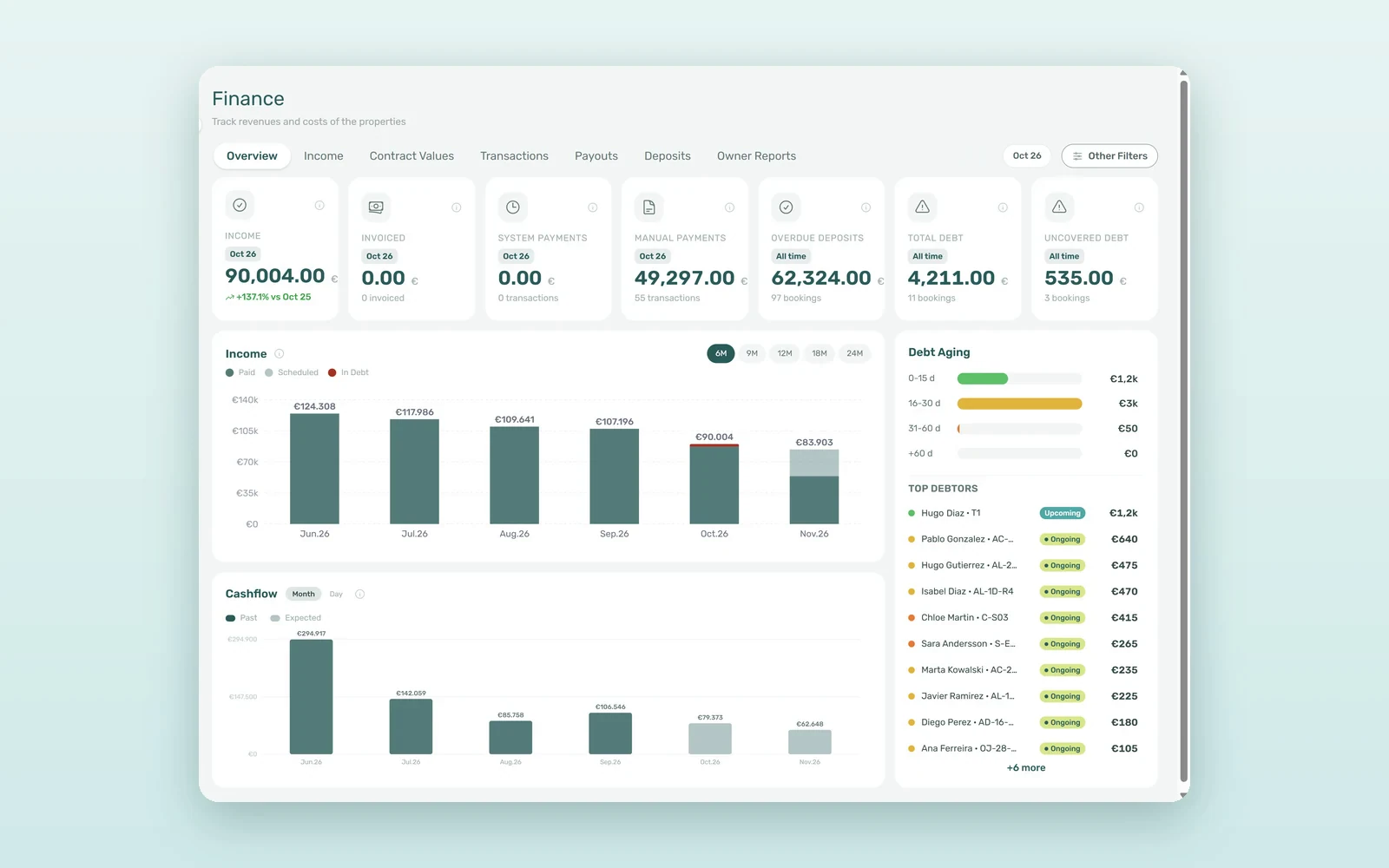
The top row shows Income, Invoiced, System Payments, Manual Payments, Overdue Deposits, Total Debt and Uncovered Debt. The first four follow the month picker - one month, or two for a range - and Income compares itself with the same months a year earlier. The last three are tagged All time, because debt does not reset on the first of the month. Click any card to open the list behind it.
2. Income month by month: paid, scheduled, in debt
The Income chart stacks each month into Paid, Scheduled and In Debt, with the total above each bar. Range pills switch between 6M, 9M, 12M, 18M and 24M, and every window includes months ahead - up to eight with 24M. Click a segment to list the charges behind it and export them to CSV or Excel.
How the cash flow forecast works
The Cashflow chart uses the same months and switches between Month and Day. Past bars show the money actually received, by payment date. Expected bars, from today on, show what is still to collect on bookings that are not cancelled, by due date - a forecast built from the payment plans you already have, with no extra data entry. Charges that are already overdue sit in neither part: they belong to debt. Click a month, or a single day, to see its payments.
How to read debt aging and top debtors
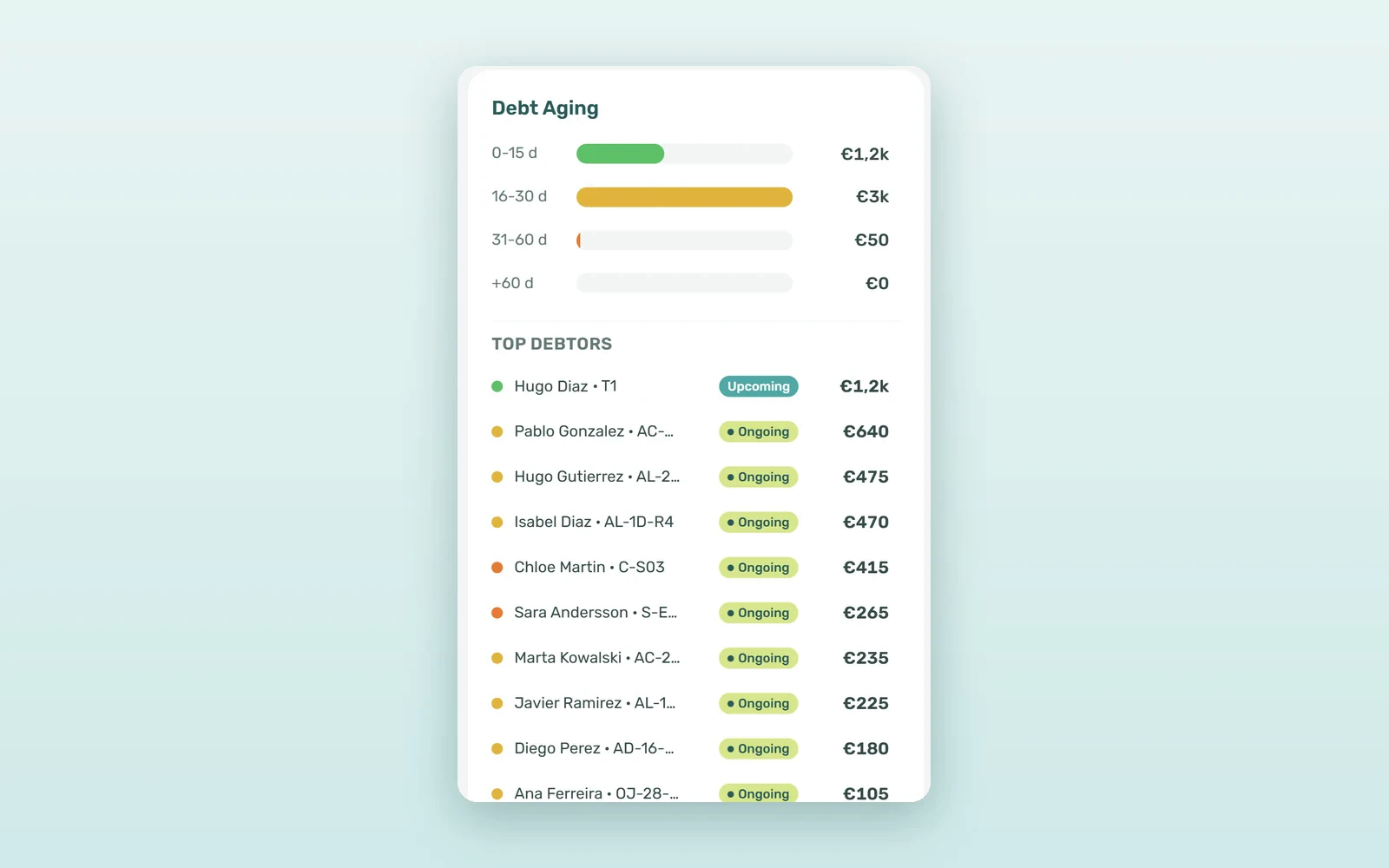
Debt Aging splits overdue debt into 0-15 d, 16-30 d, 31-60 d and +60 d. Each overdue charge goes into the band of its own due date, so a tenant who missed two months appears in two bands, and the bands add up to Total Debt. Click a band to list its bookings.
Next to the bands, Top debtors lists the bookings in debt, largest first, with a dot in the colour of their oldest band. Uncovered Debt answers the question that matters at check-out: for each booking, how much of its overdue debt is above the security deposit set on it. Much of that debt starts with unpaid move-ins, which VIVIN can cancel automatically.
How to filter the Overview by owner or property
Other Filters narrows the whole Overview by owner, property, listing category, booking category, tenant category, nationality and more. Filters live in the page address, so you can bookmark "Owner A, last six months" or send the link to a colleague. Like the rest of VIVIN's payments and rent collection tools, every figure leads back to a booking.
What a 200-room operator saves each week
An illustrative estimate for a 200-room operator with an average rent of €650, which is roughly €130,000 billed a month:
| Question | Spreadsheet | Finance Overview |
|---|---|---|
| How much did we bill and collect this month? | 30-60 min | The cards, at a glance |
| What is still due over the next months? | Rarely answered | Expected bars on Cashflow |
| Who is more than 60 days late? | 30 min of filtering | One click on +60 d |
| How much debt do deposits not cover? | Not calculated | Uncovered Debt card |
| Weekly time on finance reporting | 2-4 hours | 20-30 minutes |
That is about 1.5-3.5 hours back every week. More valuable still: when 2% of €130,000 - about €2,600 - slips into the 31-60 day band, you see it while a phone call can still recover it.
Two ways to use the cash flow forecast and debt view
The Monday check
Open Finance, read the seven cards, then click the oldest Debt Aging band. In five minutes you know what came in last week and which tenants need a call today.
Planning a renovation
Switch the Income chart to 12M. The Cashflow chart follows, and its Expected bars show the money due over the next four months - enough to decide whether the new kitchens go in this quarter or the next.
How to start your weekly finance check
- Open Finance - Overview is the first tab and needs the Finance module permission.
- Pick the period - one month, or two for a range, in the month picker.
- Choose the chart range - 6M for the near term, 24M for the long view.
- Work the debt - start with +60 d, then 31-60 d.
- Save your views - apply Other Filters and bookmark the address.
Frequently asked questions
How do you forecast cash flow for a rental portfolio?
In VIVIN, the Cashflow chart's Expected bars add up what is still to collect on every booking that is not cancelled, by due date, straight from the payment plans you already have. Past bars show the money actually received. Pick a range from 6M to 24M to look up to eight months ahead, by month or by day.
What is debt aging in property management?
Debt aging groups overdue rent and charges by how long they have been unpaid. VIVIN uses four bands - 0-15 days, 16-30, 31-60 and over 60 - and places each overdue charge in the band of its own due date, so the oldest and hardest debt to collect stands out at a glance.
What is the difference between Total Debt and Uncovered Debt?
Total Debt is the unpaid part of every charge whose due date has passed, across all bookings. Uncovered Debt keeps, for each booking, only the overdue debt above the security deposit set on that booking. The gap between the two figures is the debt your deposits already cover.
How often are the Finance Overview figures updated?
The Overview refreshes in the background about every ten minutes; with Other Filters in use, a figure can take up to an hour to catch up. Debt and overdue-deposit cards are all-time figures, so the month picker does not change them. For a payment recorded a moment ago, check Finance > Transactions.
Know where your money is, every morning. Seven figures, two charts and four debt bands, each one clickable down to the booking. Book a demo to see the Finance Overview with your own portfolio.