WhatsApp AI assistant: portfolio answers and scheduled reports
Most of your day doesn't happen at a desk. You are at a viewing, a check-in, a meeting with an owner - and that is exactly when the questions arrive: "Is Room 4B free from the 1st?", "How much does that tenant still owe?", "Who checks in this weekend?". The answer is in VIVIN, but VIVIN is on the laptop in the office - unless you have a WhatsApp AI assistant in your pocket.
Then there is the report someone builds every Monday: vacancies, open debt, the week's arrivals. It takes 45-90 minutes each week, it is out of date by Wednesday, and it stops the day that person is on holiday.
Genius on WhatsApp puts VIVIN's AI assistant, part of its AI and automation tools, in the app you already have open all day. You ask from your phone and get the answer from your live data, with the same permissions you have in the app. And with scheduled reports, the numbers you check every week arrive on their own.
Why property managers need answers away from the desk
- Questions that wait - anything you can't answer on the spot waits until you're back at a screen
- Reports built by hand - the weekly summary is copied from three screens into a message or a spreadsheet
- Screenshots as data - numbers are forwarded as pictures, and nobody knows how old they are
- Calls without context - you take the owner's call without the figures in front of you
Three weekly summaries at 20-30 minutes each come to roughly 5-7 hours a month, before counting the answers that wait half a day for someone to get back to the office.
How does a WhatsApp AI assistant for property managers work?
1. A dedicated Genius number for your account
Genius has its own WhatsApp line for your account, separate from the number your tenants talk to. VIVIN sets it up and turns it on for your account; you can see its status in Settings > AI / MCP > Genius Assistant, on the Genius WhatsApp connection card.
2. Your phone number is your key
Each team member adds their mobile number to their user in Settings > Users, in the Phone Number field. That links the number to Genius: the person can message Genius from it and act with their own permissions. Genius answers as that user - same role, same AI permissions, same areas switched on or off - and messages from numbers that are not linked to a user are ignored.
3. Ask what you'd ask in the app
Genius on WhatsApp is the same assistant as Genius in the VIVIN app (Tools > Genius), reading the same data: bookings and vacancies, tenants, tickets, payments, debt, revenue. Replies are formatted for a phone screen, and the records Genius names come with tappable links so you can open them in VIVIN. You can also send a photo along with your question.
4. Changes, only with your confirmation
In areas an admin has set to Edit, you can ask for a change from WhatsApp too - for example opening a maintenance ticket. Genius first tells you what it will do and only goes ahead after you confirm.
How to schedule vacancy, debt and check-in reports
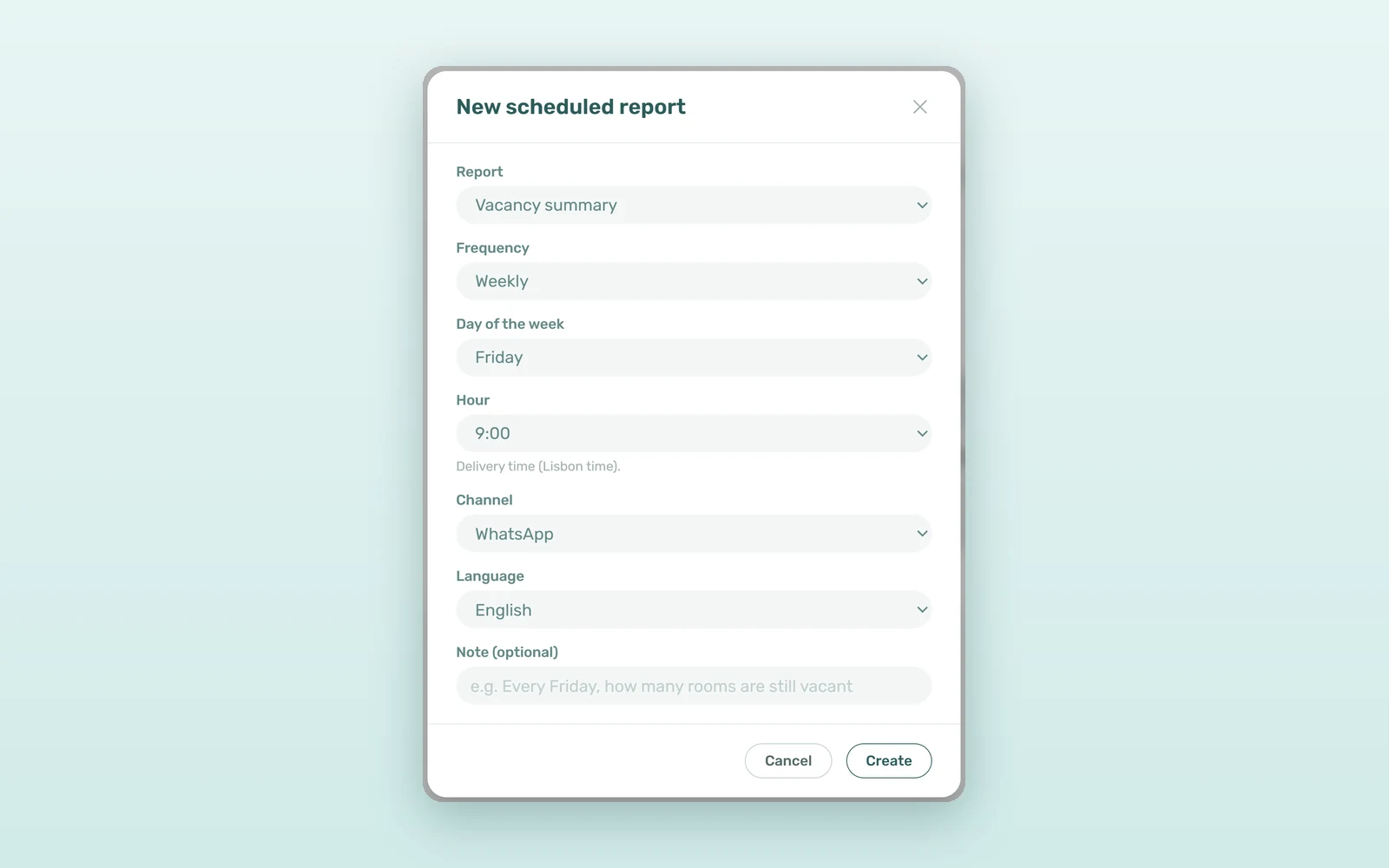
Under Settings > AI / MCP > Genius Assistant, the Scheduled reports card lists the recurring reports Genius delivers to you. Click New scheduled report and choose one of four reports:
- Vacancy summary - the units free in the next 30 days
- Open debt summary - total outstanding tenant debt and how many bookings it covers
- Upcoming check-ins - who arrives in the next 7 days
- Revenue vs target - last month against your revenue targets, with the properties furthest behind (for accounts that use revenue planning)
Then set the Frequency (Daily, Weekly or Monthly), the day, the Hour (Lisbon time), the Channel (WhatsApp, Email or WhatsApp + Email) and the Language (English or Portuguese). You don't even need the form: tell Genius "send me every Friday how many rooms are still vacant" and the schedule appears in the list.
The list shows each report's Next delivery and Last outcome, and you can Pause, Resume, Edit or Cancel it at any time. Permissions are checked again before every send: if your access changes or the module a report needs is turned off, the report is skipped and the list tells you why.
WhatsApp AI assistant vs manual weekly reports: the numbers
An illustrative estimate for one manager who builds three weekly summaries:
| Task | By hand | With Genius |
|---|---|---|
| Weekly vacancy summary | 20-30 min | Delivered on schedule |
| Monday open debt summary | 20-30 min | Delivered on schedule |
| Check-ins for the coming week | 20-30 min | Delivered on schedule |
| A question asked on the move | Waits until you're back | Answered in WhatsApp |
| Reporting time per month | 5-7 hours | A few minutes to set up |
Beyond the hours, the gain is consistency: the same numbers, at the same hour, every week - whoever is in the office.
How coliving and student housing managers use it
The Friday vacancy check
A coliving manager asks Genius to send the vacancy summary every Friday at 17:00 on WhatsApp, so the weekend's viewings are planned before leaving the office.
Debt by email for finance
The finance lead gets the open debt summary every Monday at 9:00 by email, in Portuguese, ready to forward to the collections team.
Revenue vs target on the 1st
An operator with monthly revenue targets receives the Revenue vs target report on day 1 of each month, with the three properties furthest behind plan.
How to set up Genius on WhatsApp
- Ask VIVIN to turn on Genius on WhatsApp for your account, then check the status in Settings > AI / MCP > Genius Assistant.
- Add each manager's mobile number in Settings > Users (Phone Number).
- Check what the AI may read and change in Settings > AI / MCP > Permissions.
- Save the Genius number in your phone and send your first question.
- Create a report with New scheduled report, or simply ask Genius to schedule one for you.
Not on VIVIN yet? Book a demo to see Genius and scheduled reports on a live account.
Frequently asked questions
Can property managers use an AI assistant on WhatsApp?
Yes. With Genius on WhatsApp, each manager links their mobile number in Settings > Users and messages a dedicated Genius number for the account. Genius answers from live VIVIN data with that user's role and AI permissions, and ignores messages from numbers that are not linked to a user.
What reports can Genius send on a schedule?
Four: Vacancy summary (units free in the next 30 days), Open debt summary, Upcoming check-ins (next 7 days) and Revenue vs target for accounts that use revenue planning. Each runs daily, weekly or monthly at the hour you choose, on WhatsApp, email or both, in English or Portuguese.
Are the numbers in a scheduled report written by AI?
No. Genius only schedules the report. The figures come from the same data queries the VIVIN app uses, so a delivered report cannot invent a number. Permissions are checked before every send, and the list in Settings shows the last outcome of each report, including why one was skipped.
Your portfolio, in your pocket. Ask when the question comes up, and let the weekly numbers come to you instead of the other way round.