Book a viewing online: video call or in-person visits
Portugal had 80,065 international students in 2024/25, out of 456,032 (Savills), and on HousingAnywhere 14.5 students were interested in every available room in August 2026 (HousingAnywhere). Most of them choose a room from another country, weeks or months before they arrive. They cannot fly in for a viewing, and while they wait for one, the room goes to someone else.
Vivin's booking engine lets tenants book a viewing online on your own booking website: a Live Video Call or an In-Person Visit, with up to three proposed time slots inside the visit hours you set for each listing. The virtual viewing is a video call that runs in the browser, so the tenant has nothing to install.
Why do international students and remote tenants need virtual viewings?
Photos sell a room, but they do not answer everything. A student moving from Milan to Lisbon wants to know how big the room really is, how much light it gets, whether the street is noisy, what the kitchen looks like on a weekday evening and who else lives there. A professional relocating for a new job has the same questions and even less time. Without a way to see the room, many keep looking, or book somewhere that lets them.
- Distance - a flight for a 20-minute viewing is not an option for most students.
- Trust - a live call from inside the room, with someone from your team, reassures a tenant who has never been to the city.
- Speed - a viewing tomorrow afternoon beats one "when you arrive".
How does booking a viewing online work?
1. Visit first, from the room's page
On the room listing page, the tenant picks a move-in and a move-out date. The booking card then offers Book now and Visit first. If a listing does not take visits, the page says so and the button stays off.
2. Choose the visit type
The flow first reminds the tenant what booking the room would cost after the visit: the first month's rent and the payments due at check-in. Then, under 1. Choose visit type, they pick a Live Video Call, to see the room online in real time, or an In-Person Visit at the address. When a listing accepts video calls only, only the video option appears.
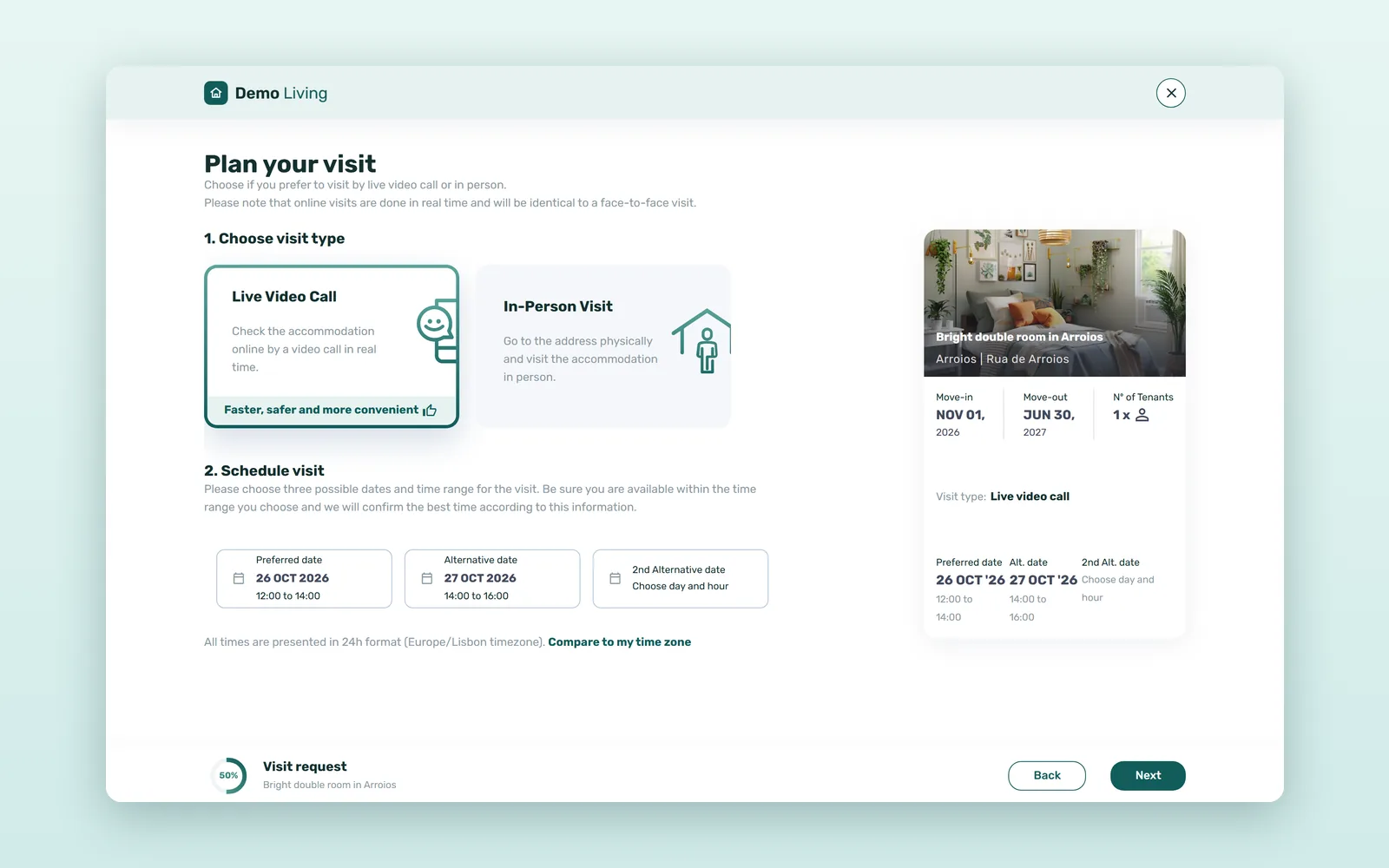
3. Propose up to three time slots
Under 2. Schedule visit, the tenant fills a Preferred date, an Alternative date and a 2nd Alternative date. Each one is a day in the next seven days and a two-hour slot cut from the listing's weekly visit hours, at least 12 hours ahead. Times are shown in 24-hour format in the listing's time zone, with a Compare to my time zone link for someone abroad.
4. Sign in and send the request
The tenant signs in or creates an account, adds a few details such as a phone number, and sends the visit request.
5. Your team confirms a time
Your team picks one exact time inside one of the proposed slots. The tenant then gets a confirmation email with the date and time and, for a video call, the link to start the visit; for an in-person visit, the address.
6. The video call runs in the browser
At the agreed time, the tenant and your team join from that link, on your booking website, with no app to download. Camera and microphone can be switched off and on, and whoever shows the room can flip to the phone's back camera to walk through the bedroom, the kitchen and the bathroom.
How do operators control viewings for each listing?
Visits follow a few settings per listing, so each building can work the way your team does:
| Setting for the listing | What the tenant sees |
|---|---|
| No visits | Visits accepted: no; Visit first stays off |
| Video calls only | Only Live Video Call |
| In person and by video call | Live Video Call and In-Person Visit |
| Weekly visit hours, for example Monday, Wednesday and Thursday, 14:00-19:00 | Slots of 14:00-16:00, 16:00-18:00 and 18:00-19:00 on those days |
| Minimum notice (12 hours, on every listing) | Slots starting within 12 hours cannot be picked |
Each room page also shows whether visits are accepted among its house details, so tenants know before they choose dates.
What can video viewings do for remote tenants? A worked example
An illustrative estimate, not Vivin data. A student housing operator gets 40 inquiries a month from students who are still abroad. Assume that with in-person viewings only, 1 in 10 of them books (the few who book unseen or can travel), and that with video viewings 1 in 5 books after seeing the room live. Rent is €635 a month, the European median for a room in the third quarter of 2026 (HousingAnywhere Rent Index), for a 10-month stay.
| Per month of inquiries | In-person viewings only | Video and in-person viewings |
|---|---|---|
| Inquiries from abroad | 40 | 40 |
| Booking rate (assumed) | 1 in 10 | 1 in 5 |
| Bookings | 4 | 8 |
| Rent contracted (10 months at €635) | €25,400 | €50,800 |
Four more rooms let from one month of inquiries is €25,400 of contracted rent in this example. Even if video viewings add just one booking a month, that is €6,350 of rent and one less empty room to chase. Compare with your own numbers: how many remote inquiries turned into bookings before and after you offered video viewings.
How to set up online viewings for your rooms
- Decide, per listing, whether you accept visits, and whether by video call only or also in person.
- Set weekly visit hours when someone from your team can show the room.
- Prepare a short route for video calls: the room, the view from the window, storage, bathroom, kitchen and common areas.
- Confirm each request quickly, inside one of the slots the tenant proposed.
- After the call, point the tenant to Book now on the room's page.
Viewings are one part of a direct booking website for coliving and student housing. The others are a room listing page that answers questions before the call, and a listing written to invite one (how to write a rental listing that gets more inquiries). See the Vivin booking engine and how Vivin works for student housing operators, or book a demo.
Frequently asked questions
How do I offer virtual viewings for rental rooms?
With Vivin's booking engine, each room page on your booking website has a Visit first button. The tenant chooses Live Video Call or In-Person Visit, proposes up to three time slots, and your team confirms one. The video call runs in the browser from a link in the confirmation email, so nobody needs an app.
Can I offer video viewings only for some listings?
Yes. Each listing accepts video calls only, both video calls and in-person visits, or no visits at all. Each listing also has its own weekly visit hours, which tenants see as two-hour slots.
How far in advance can a tenant book a viewing?
Tenants pick from the next seven days, at least 12 hours ahead, inside the listing's visit hours. Times are shown in the listing's time zone, with a link to compare with their own.
Does a viewing reserve the room?
No. A viewing is not a booking. To secure the room, the tenant books it with Book now on the room's page, before or after the call.
Let remote tenants see the room before they commit. A short live call from inside the room answers what photos cannot, and turns an inquiry from abroad into a booking.