Direct booking website for coliving and student housing
When a tenant finds your room on a portal, both sides pay for the introduction. On HousingAnywhere, the operator's standard commission is 8% of the total contract value, and in many countries the tenant also pays a Tenant Protection fee of 25-40% of the first month's rent, with a €175 minimum (HousingAnywhere help center). Portals bring reach, but a tenant who already knows your name should not need one to book with you.
Vivin's booking engine gives coliving and student housing operators a direct booking website of their own: your brand and domain, your rooms on a map and in a list, filters for dates, budget and room type, viewings by video call or in person, and online booking. Listings come from Vivin, so nothing is typed twice, and every booking lands in Vivin.
What is a direct booking website for coliving and student housing?
It is an operator's own site where tenants search available rooms, compare them, book a viewing and book online, with no portal in between. For coliving and student housing it has to work room by room and month by month: move-in and move-out dates instead of nights, a monthly price, house rules, and the conditions a tenant checks before committing to a semester or a year. A brochure site with a contact form cannot take the booking; a hotel booking engine thinks in nights.
How do tenants search and filter rooms on a direct booking website?
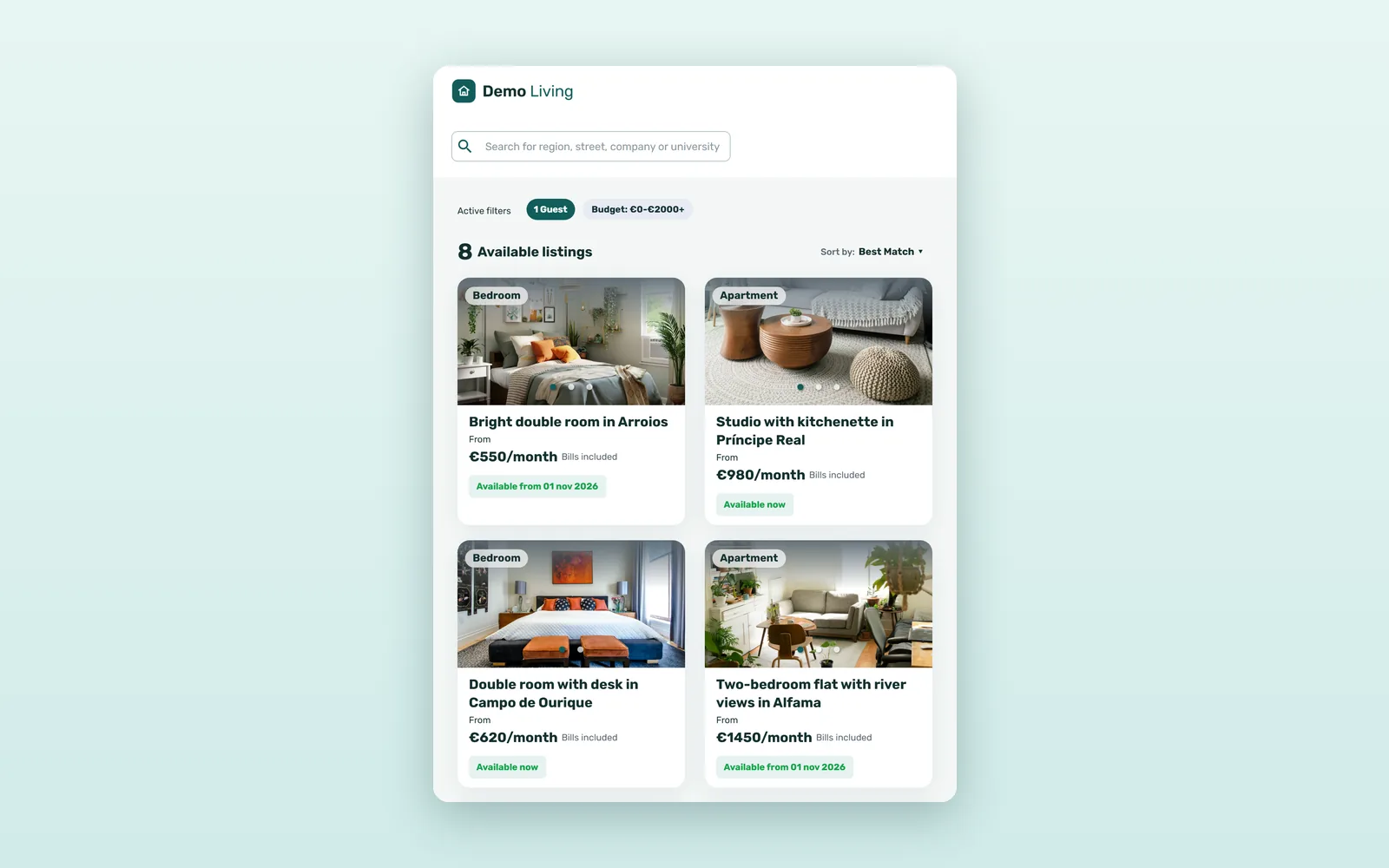
Most tenants start on the search page, which shows your available rooms as a list next to a map. On a phone, Filters, Map and List become tabs.
1. A list and a map, side by side
Each result shows the neighborhood, the room's title, the monthly price and whether it is Available now or Available from a given date. The search box takes a region, a street, a company or a university, and Sort by offers Best Match, Price - Low to High, Price - High to Low and Recently updated.
2. Dates that can flex
Tenants set a Move-In and a Move-Out date, as Exact dates or widened by ± 1, 2, 3, 7 or 15 days. A student who can arrive any time in the first week of September sees every room that fits, not only the ones free on the 1st.
3. All filters
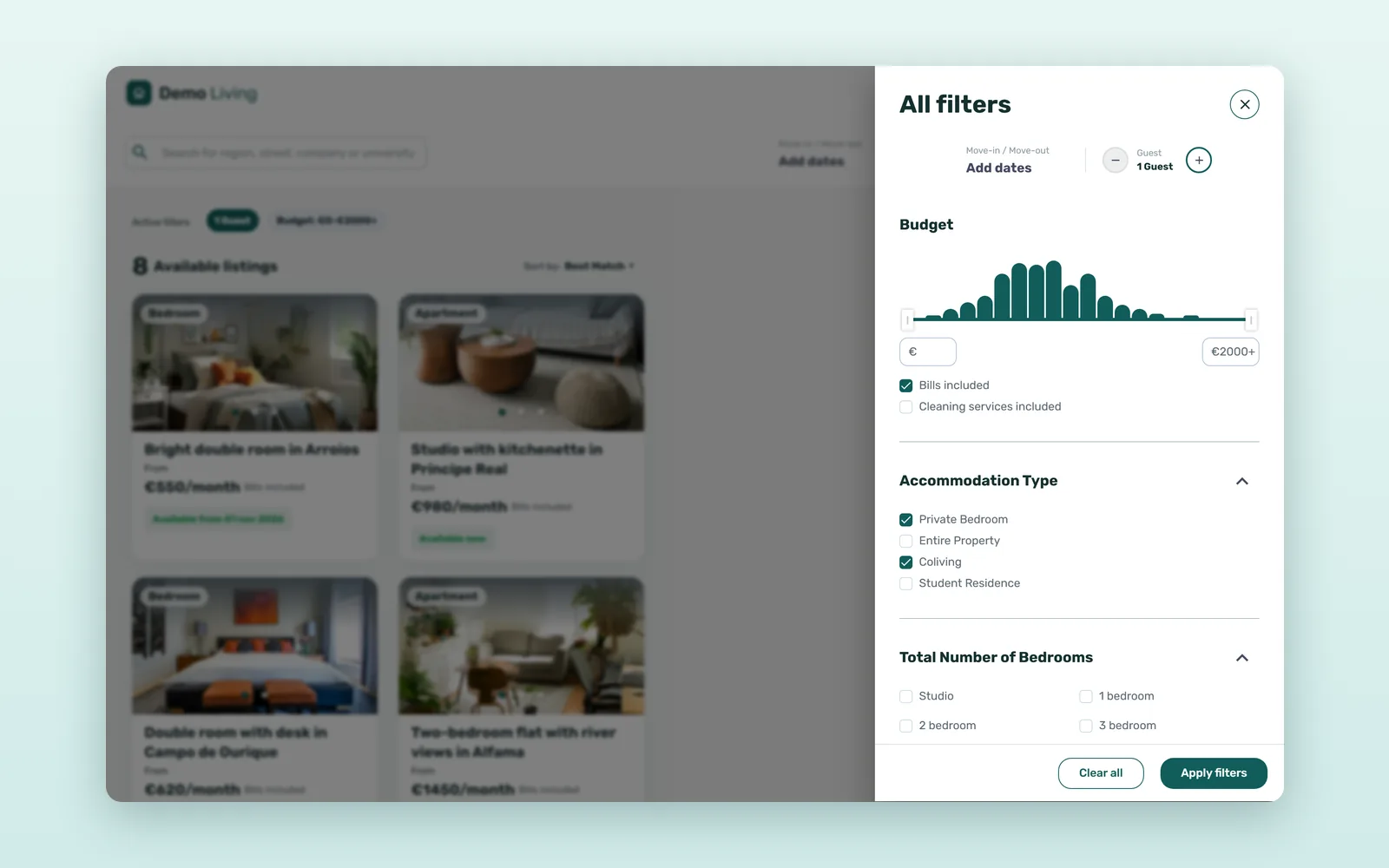
All filters opens the full set: Budget, Accommodation Type (Private Bedroom, Entire Property and, where your portfolio has them, Coliving or Student Residence), Total Number of Bedrooms, Bathrooms (including Private bathroom), Bedroom Features, House Features and House Rules, such as Couples allowed or Suitable for students. Optional filters are switched on with the Vivin team, so tenants only see those that fit your portfolio.
Why run your own booking website next to the portals?
Not instead of them. Portals are where many tenants start, and listing on several is how rooms fill faster, as we explain in how to maximize occupancy with multi-channel distribution. But every operator also has demand that already knows its name: returning tenants, their friends, students from partner universities, people who found you on social media. That demand does not need a portal, and every booking it makes directly keeps a portal's commission and tenant fee out of the deal. See what each rental platform charges in 2026.
| Question | Portal listing | Your own booking website |
|---|---|---|
| What the tenant sees | The portal's brand, next to other operators' rooms | Your brand, your domain, only your rooms |
| Who finds you | People searching the portal for a city | People who already know you |
| Cost per booking | Commission and/or tenant fee, set by each portal | Card processing and your software costs |
| Viewings | Depends on the portal | Live Video Call or In-Person Visit, built in |
| First conversation | Through the portal's messages | Directly with your team |
How does the booking website work with Vivin?
- Listings come from Vivin - the photos, descriptions, monthly prices and availability your team keeps in Vivin are what the site shows. There is no second catalog to maintain.
- Bookings land in Vivin - a room booked on the site arrives in Vivin with the tenant and the dates; see from direct booking to PMS with no double entry.
- Viewings are built in - see how tenants book a viewing online.
- Every room has its own page - with house rules, neighborhood and Rental conditions; see what a room listing page should show.
- Your brand, your domain - your logo and colors on your own domain, for example rent.yourbrand.com, set up with the Vivin team, in English, Portuguese, Spanish and Italian.
How much can direct bookings save? A worked example
An illustrative estimate: 80 rooms, six-month stays (about 160 lets a year) and €635 a month, the European median room rent in the third quarter of 2026 (HousingAnywhere Rent Index), so each contract is worth €3,810. Suppose your own site brings in one let in five, 32 a year, that would otherwise have paid a portal the standard 8%. Card processing uses Stripe's standard rate for European cards, 1.5% + €0.25:
| Item | Per let | 32 lets a year |
|---|---|---|
| Portal commission (8% of €3,810) | €304.80 + VAT | €9,753.60 + VAT |
| Card processing on the first month's rent | €9.78 | €312.96 |
| Difference, before software costs | €295.02 | €9,440.64 |
That is roughly €9,400 a year before your software costs, and each of those 32 tenants also skips a portal tenant fee of €175-254 (HousingAnywhere). Run the same arithmetic with your own rents, stay lengths and share of direct bookings.
How to launch your direct booking website
- Agree your logo, colors and domain with the Vivin team.
- Check each room in Vivin: photos, description, monthly price and availability are what tenants will see.
- Decide, per listing, whether tenants can visit by video call only or also in person, and when.
- Fill in the rental conditions: minimum stay, deposit, cancellation policy and documents required.
- Link the site from your main website, your social profiles and your replies to room inquiries.
See the full Vivin booking engine and how Vivin works for coliving operators, or book a demo with your own rooms.
Frequently asked questions
What is a direct booking website for coliving and student housing?
It is the operator's own website, where tenants search available rooms on a map and in a list, filter by dates, budget and room type, book a viewing and book online without a portal. Vivin's booking engine builds it from the listings already in Vivin, under the operator's brand and domain.
Does a direct booking website replace portals like HousingAnywhere or Spotahome?
No. Portals bring tenants who do not know you yet, so most operators keep them. The direct booking website serves the demand that already knows your brand, such as returning tenants and referrals, so those bookings pay no portal commission or portal tenant fee.
How do tenants pay when they book on the website?
They choose their dates, click Book now and pay the first month's rent by card through Stripe. The security deposit and any admin fee are paid at check-in, as the room's Rental conditions show.
Do I need to enter my rooms again for the booking website?
No. The site shows the listings you already manage in Vivin, with their photos, prices and availability, and its bookings land in Vivin. Branding and domain are set up once, with the Vivin team.
Portals for reach, your own site for the tenants who already know you.