Room listing page: what tenants need to see before booking
Every day a room stays empty costs money: at €635 a month, the European median rent for a room in the third quarter of 2026 (HousingAnywhere Rent Index), that is about €21 a day. And every question a listing leaves open - the minimum stay, the deposit, the documents, what happens if plans change - is one more message to answer, and often a day lost while the tenant keeps looking elsewhere.
In Vivin's booking engine, every room has a room listing page on your booking website that answers those questions before they are asked: photos, the house and its rules, the neighborhood, month-by-month availability and price, and a Rental conditions block with minimum and maximum stay, security deposit, cancellation policy and the documents required.
What should a room listing page show before a tenant books?
Everything a tenant needs to decide without writing to you. Every room page on a Vivin booking website has the same sections, in the same order.
1. Photos, title and the booking card
The top carries the gallery (Show all photos), the neighborhood, the room's title and its street. Next to it, the booking card asks for move-in and move-out dates and the number of Tenants, shows the Total to book and opens See all payment details: what is paid to book and what is paid during the stay. With dates in, the buttons are Book now and Visit first.
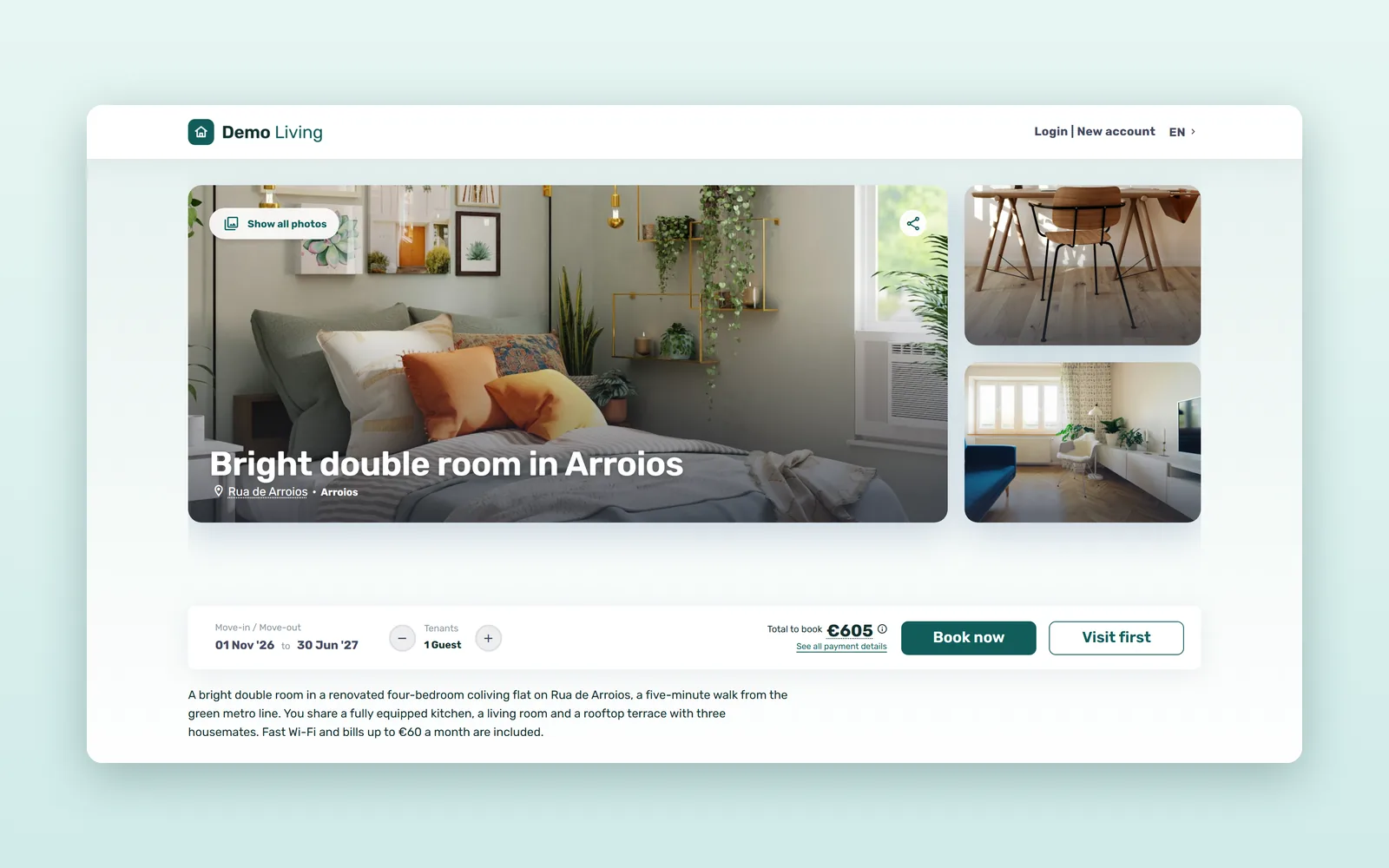
2. About this place, house details and amenities
Your description comes first, then the facts tenants compare: type of accommodation, capacity, bedrooms and bathrooms in the home, Wi-fi, elevator, the walk to public transport and the supermarket, and whether visits are accepted. Amenities follow area by area: bedroom, kitchen, each bathroom, living room.
3. House rules
Guests (and what they cost per night), smoking, pets, whether the home suits students, professionals or both, and any gender restriction. A tenant who does not match a rule, such as students only, cannot book that room, so nobody finds out after paying.
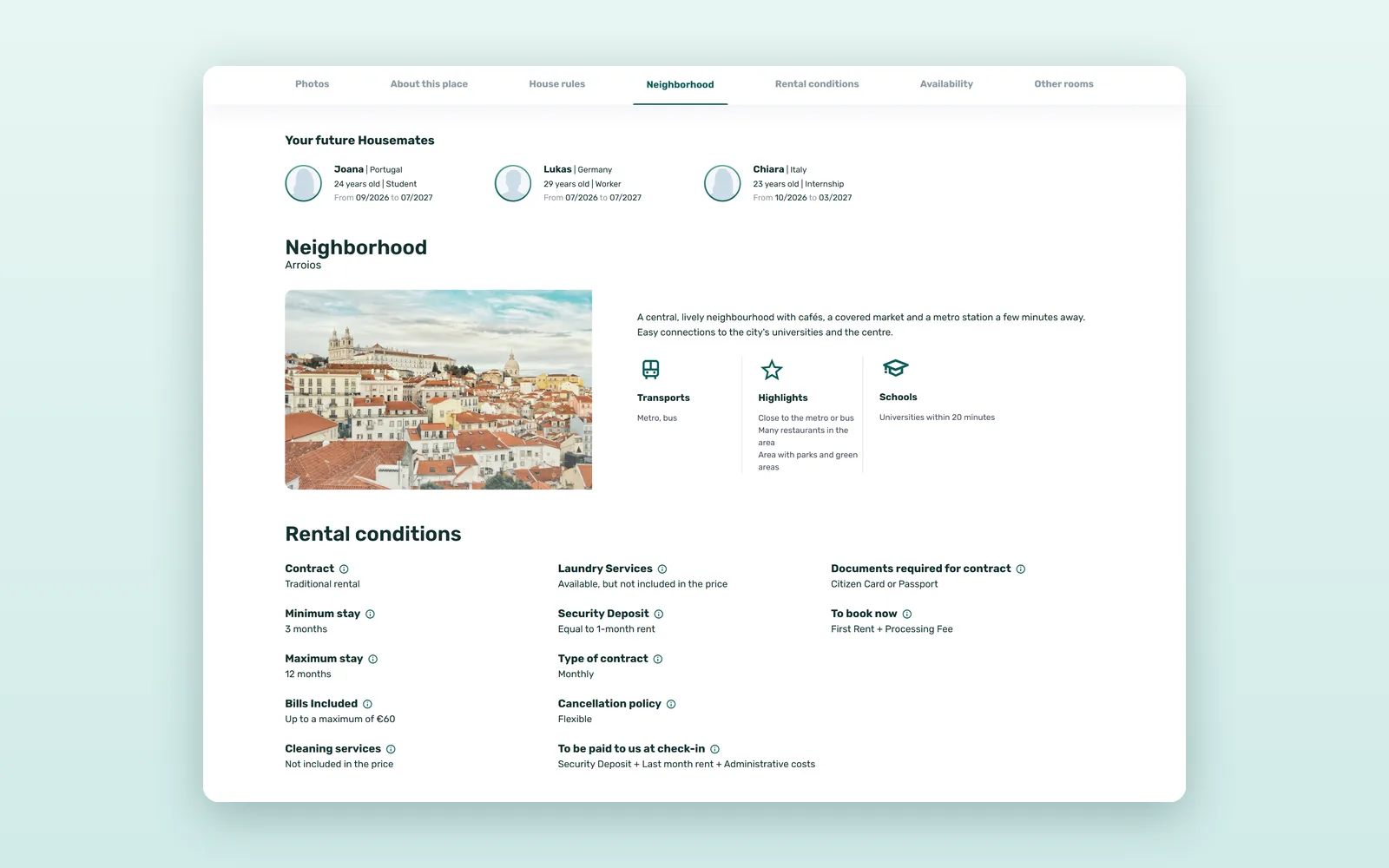
4. Your future Housemates
In shared homes, this section shows the first name and age of the tenants living there who agreed to show their information to future housemates, which helps a tenant picture daily life in the flat. The section only appears when there is someone to show.
5. Neighborhood and address privacy
A description of the area, the transport lines nearby and, where you add them, the universities close by. The page shows the street but not the number, and the map pin is approximate. The full address is shared once the booking is confirmed, or with the confirmation of an in-person visit.
6. Rental conditions
Each line answers a question tenants would otherwise send by email or WhatsApp:
| Line | The question it answers |
|---|---|
| Minimum stay / Maximum stay | Can I book just for one semester? |
| Security Deposit | How much is it? (paid at move-in, returned at the end of the stay) |
| Type of contract | If I arrive on the 20th, do I pay a full month? (by the night, by the fortnight or full months) |
| Cancellation policy | What if my plans change? (Non-refundable, or Flexible, Moderate and Strict: first rent back if I cancel 15, 30 or 60 days before move-in) |
| Documents required for contract | What do you need from me? (for example an ID card or passport) |
| To book now / To be paid to us at check-in | What do I pay today, and what when I arrive? |
| Bills Included | Are bills included, and up to what amount? |
The same block covers the kind of contract, cleaning and laundry services and, when the room has one, the Discount for long stays.
7. Availability, other rooms and similar places
Availability says Available now! or from which date, with the price per month for the months ahead, so a tenant sees whether the summer costs less. If the room does not fit, the other rooms in the house and Similar places keep the tenant on your site instead of sending them back to a portal.
How to write a room rental listing that answers questions up front
The structure is the same for every room; what makes it work is what you put in it (see also how to write a rental listing that gets more inquiries):
- A title that says what and where - room type, best feature and area, for example "Quiet double room with desk in Arroios, near the metro".
- Photos of every area - the room first, in daylight, then bathroom, kitchen and common areas.
- A description for the person - who the home suits and how far the university or office is.
- Every rental condition filled in - a blank line becomes a question.
- Current prices and availability - the page shows what Vivin holds, so keep the room up to date there.
How much back-and-forth do clear rental conditions save? A worked example
An illustrative estimate for an operator receiving 120 inquiries a month. Assume 40% include a question the Rental conditions block answers, that each exchange takes 10 minutes of team time and delays the tenant's decision by a day, and that a complete page answers half of them.
| Per month | Conditions sent by message | Conditions on the page |
|---|---|---|
| Inquiries with a conditions question | 48 | 24 |
| Team time (10 minutes each) | 8 hours | 4 hours |
| Days tenants wait for an answer | 48 | 24 |
Four hours a month back for the team, and 24 fewer days in which an unanswered tenant looks at other rooms. At about €21 a day of empty room, one booking made a week sooner is worth around €146.
How to get your room listing pages ready
- Check each room in Vivin: photos of every area, description, monthly price and availability.
- Fill in the rental conditions, from minimum stay to documents required.
- Set the house rules and the neighborhood details, including transport and universities.
- Decide whether each listing accepts visits, and how: see how tenants book a viewing online.
- Open a room page on your phone and read it as a tenant would.
The room listing page is the heart of a direct booking website for coliving and student housing, and the last step before tenants book online and pay the first month's rent by card. See the Vivin booking engine, or book a demo with your own rooms.
Frequently asked questions
What should a room rental listing include?
Photos of every area, a clear title and description, house details and amenities, house rules, the neighborhood and the rental conditions: minimum and maximum stay, security deposit, cancellation policy, documents required, and what is paid to book and at check-in.
Does the room listing page show the full address?
No. It shows the street and an approximate map pin, enough to judge the area and the commute. The full address is shared once the booking is confirmed, or in the confirmation of an in-person visit.
Who appears under Your future Housemates?
The tenants living in the shared home who agreed to show their information to future housemates. The section shows their first name and age, and only appears in shared homes when there is someone to show.
What does a tenant pay to book, and what at check-in?
To book, the tenant pays the first month's rent by card through Stripe, plus a booking fee if the operator charges one. The security deposit and any administrative costs are paid at check-in. The Rental conditions block shows both before the tenant starts.
Answer on the page, not in the inbox.