Take rent payments online at booking: first month by card
A tenant says yes on Monday, gets your IBAN on Tuesday and promises the transfer "this week". Ten days later nothing has arrived, the room has been off the market all that time and the next applicant has signed somewhere else. At €600 a month, every day a room is held for a tenant who never pays costs about €20, so those ten days cost €200 before anyone has even chased the transfer.
Vivin's booking engine lets you take rent payments online at booking: on your own booking site, the tenant books the room and pays the first month's rent by card through Stripe in the same flow. The security deposit and fees are paid at check-in, and the rest of the stay runs on the booking's payment plan in Vivin, like any other booking.
Why ask for the first month's rent at booking?
- A booking with money behind it - a tenant who has paid a month's rent has a reason to turn up; a "yes" by message does not.
- No IBAN back-and-forth - no bank details to send, no proof-of-transfer screenshots, no anonymous transfers to match to a tenant.
- Tenants from abroad - a card works from any country in a few minutes, while an international transfer can take days.
Many coliving and student housing tenants book from abroad, months ahead, and already pay by card for flights and hotels.
What does the tenant pay, and when?
The tenant sees every payment moment before paying anything:
| When | What | How |
|---|---|---|
| At booking | The first month's rent, plus any booking fee shown in the total | Online, by card through Stripe |
| At check-in | The security deposit and fees such as an admin fee | Paid to you, outside the booking site |
| During the stay | The monthly rent | The booking's payment plan in Vivin |
| After check-out | The deposit refund | Vivin's deposit tracking |
How does online booking payment for rentals work on a Vivin booking site?
1. The tenant sees the full price before booking
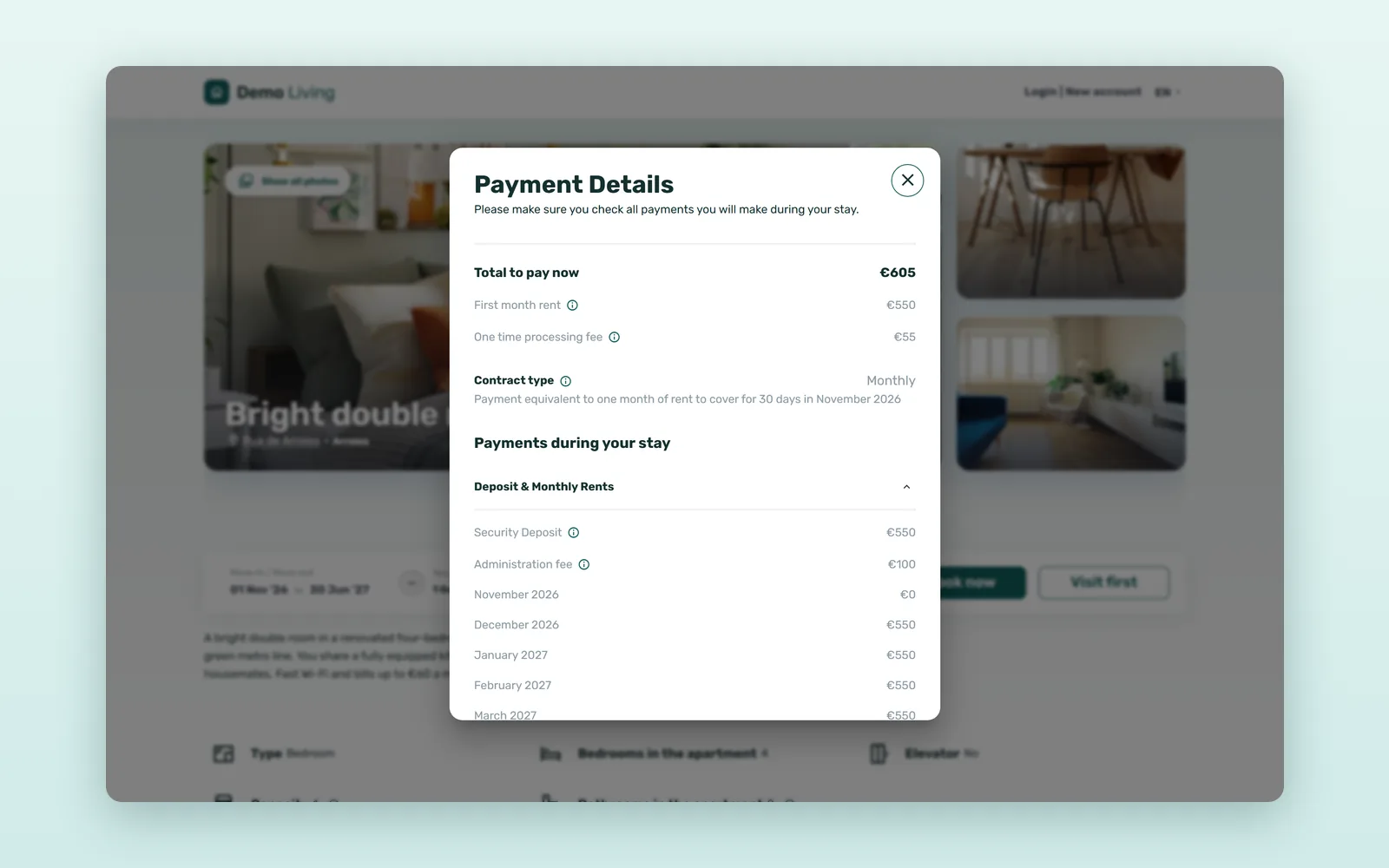
On each room page, the booking card takes the dates and the number of Tenants and shows the Total to book: the first month's rent plus any booking fee, so nothing is added at the last step. See all payment details splits it into Payments to book the place now and Payments during your stay, with the security deposit to be refunded at the end. Under Rental conditions, To be paid to us at check-in lists what the tenant pays on arrival.
2. A short booking flow on your own site
After Book now, Booking information reminds the tenant of the Check-in Payments and the Security Deposit - refundable at the end. The tenant then logs in or creates an account with their email, adds a few details about themselves and confirms them. The whole flow runs on your domain, with your logo and colours.
3. Pay & Book: the first rent by card
The last step, Pay & Book, takes the payment through Stripe: by card, or with a wallet such as Apple Pay or Google Pay when it is enabled on your Stripe account. Card details are handled by Stripe, never by your team. An optional Billing details block takes the tenant's fiscal name, VAT number and fiscal address. Before paying, the booking summary also shows the date until which the tenant can cancel and still get the first rent back.
4. The booking lands in Vivin
The paid booking arrives in Vivin as a normal booking, with the dates, the rent and the listing's deposit and fees, ready for the contract, the payment plan and the tenant's onboarding. Its dates close everywhere else you sell the room. What happens after a direct booking walks through each step.
What happens with the deposit and the later rents?
Everything after the first rent is managed in Vivin, as for any other booking:
- Security deposit - paid at check-in and followed from payment to refund in Finance > Deposits, as described in the security deposit lifecycle.
- Monthly rent - collected through the booking's payment plan with Vivin payments.
- Move-in payments that do not arrive - Vivin can warn your team about unpaid move-in payments a few days after check-in.
What happens if the tenant cancels?
Each room page shows its Cancellation policy under Rental conditions, with a short explanation. A policy is either not refundable or refundable with 15, 30 or 60 days' notice: a tenant who cancels at least that long before the contract starts gets the first rent back, and one who cancels later does not. If you have to cancel a booking yourself, the tenant gets a full refund.
Choose the policy that fits your tenants: students who book a September room in April leave you time to let it again, so 30 or 60 days suits them, while a flexible policy suits last-minute bookings.
How much does taking the first rent at booking save?
An illustrative estimate for an operator with 30 direct bookings a month:
| Task | Transfer after a "yes" | First rent paid at booking |
|---|---|---|
| Messages to send bank details and chase the transfer | 3-5 per booking | 0-1 |
| Time until the first rent arrives | 1-5 days | When the tenant books |
| Matching transfers to tenants | 5-10 minutes each | No transfer to match |
| Rooms held for a tenant who never pays | 1-2 a month, 7-14 days each | Rare: the tenant paid to book |
| Team time per month | 8-12 hours | 1-2 hours |
That is roughly 7-10 hours a month back, and every room not held ten days for a tenant who never pays keeps €200 of rent on sale.
How to start taking rent payments online at booking
- Choose the cancellation policy that fits your tenants.
- Check each room's rent in Vivin, and the deposit and fees tenants will see on the room page.
- Make sure the payment methods you want to offer are enabled on your Stripe account.
See how Vivin's booking engine works with Vivin payments, or book a demo to walk through a booking with your own rooms.
Frequently asked questions
Can tenants pay the first month's rent online when they book?
Yes. On a Vivin booking site, the tenant pays the first month's rent in the Pay & Book step, by card through Stripe or with a wallet such as Apple Pay or Google Pay when it is enabled on your Stripe account. The Total to book on the room page shows the amount, including any booking fee, before the tenant starts.
Is the security deposit paid online at booking?
No. The booking site takes the first month's rent; the security deposit and fees such as an admin fee are paid at check-in, as the room page says under To be paid to us at check-in. Vivin then follows the deposit from payment to refund, like any other.
Does the tenant get the first rent back if they cancel?
It depends on the cancellation policy shown on the room page. With a refundable policy, a tenant who cancels at least 15, 30 or 60 days before the contract starts, depending on the policy, gets the first rent back, and the booking summary shows the last date to do so. A non-refundable policy keeps it. If you cancel, the tenant is refunded in full.
A "yes" is not a booking until it is paid. Let tenants book and pay the first rent in one go, and keep your follow-up for the people moving in.