AI FAQ generator: turn 6 months of tenant chats into answers

Open your WhatsApp history from the last few months and count. In a 120-room coliving building, a typical month brings 300-500 tenant messages, and a large share of them are the same questions in different words: "How do I pay the deposit?", "Can a friend stay over?", "When are the rooms cleaned?". You answer each one by hand, every intake, because nobody ever had a free afternoon to turn those answers into a proper FAQ.
That is the job for an AI FAQ generator. When an FAQ exists at all, it was usually written once, at launch, from memory - answering the questions you thought tenants would ask, not the ones they actually send you.
VIVIN's FAQ Generator starts from the real thing: your tenants' own conversations. It reads up to six months of chat and email history, finds the questions that come up most, and writes FAQ drafts you can review and publish to the tenant portal and the tenant WhatsApp assistant. It is part of VIVIN's AI and automation tools for coliving, student housing and mid-term rental teams.
Why a hand-written tenant FAQ falls behind
The manual way usually looks like this:
- Guesswork - the list reflects what the team remembers, not what tenants asked last month
- Hours of reading - finding the top 10 questions in 2,000 messages takes a day or two that nobody has
- One channel only - the answers live in a PDF or a web page, while tenants keep asking on WhatsApp
- Stale content - house rules, payment methods and check-in steps change, and the FAQ does not
The result is that your team keeps acting as the FAQ. If 160 of 400 monthly messages are repeat questions and each takes 3-4 minutes to answer, that is 8-11 hours a month spent typing answers you have already typed.
How does an AI FAQ generator work?
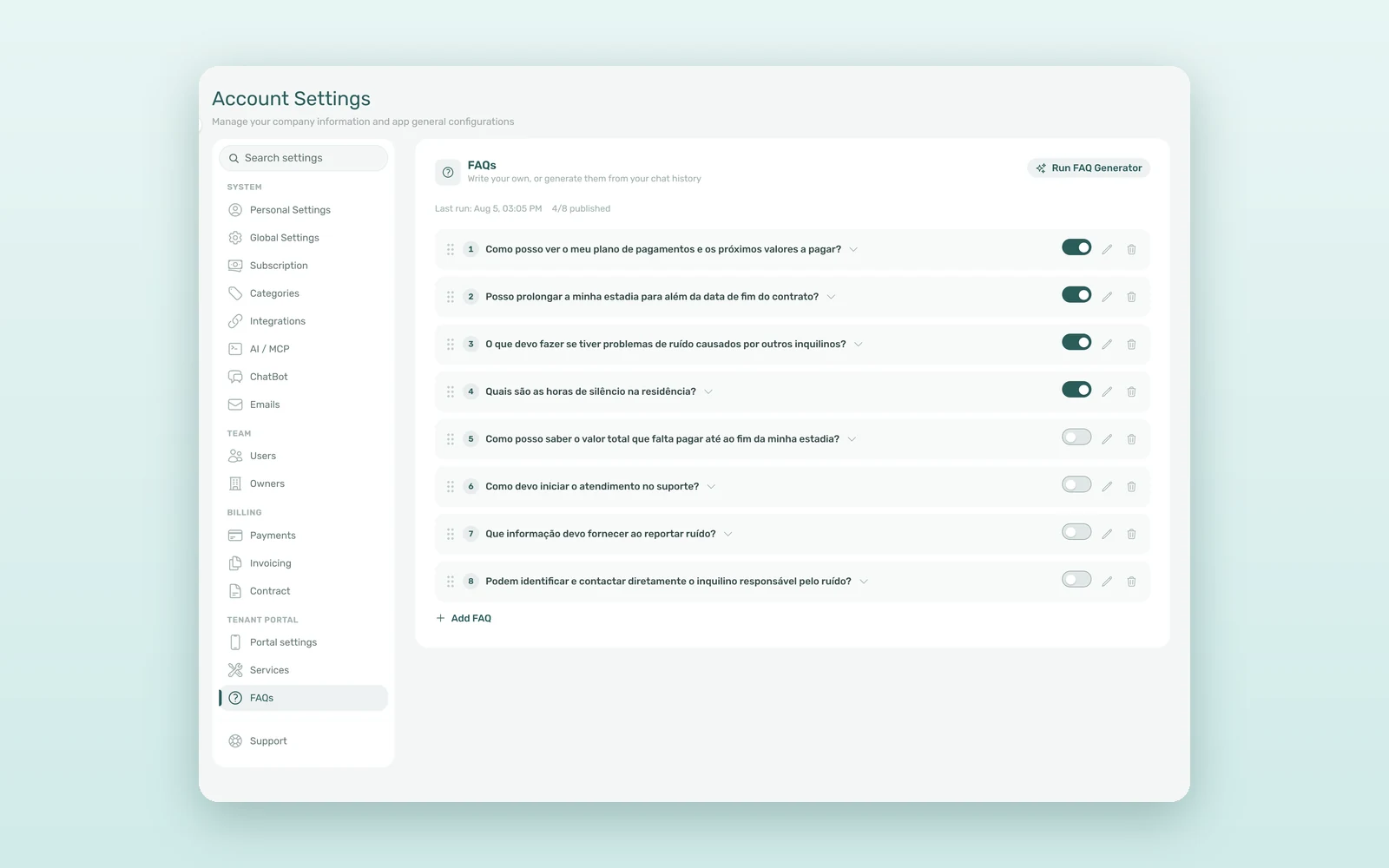
You find it in Settings > FAQs, in the Tenant Portal group. The page holds your whole FAQ list, and the Run FAQ Generator button starts a scan.
1. Choose how much history to scan
Under History to scan you pick a window from 1 to 6 months (3 months by default). The generator reads your tenants' WhatsApp conversations and emails from that period, together with your chatbot's IF/THEN rules. Automatic system emails are left out, so the drafts come from real questions, not from your own notifications.
2. See the cost before you run it
Before anything happens, the window shows what will be read - for example 1,240 WhatsApp messages · 85 emails · 12 rules - and an estimated cost for the scan. A longer window finds more topics but costs more, so you decide the trade-off up front.
3. Review the drafts
A run usually takes 10-30 seconds. Each run adds up to 10 new FAQ suggestions, ordered from most to least common and written in the language most of your tenants write in. Topics you already cover are skipped, and existing entries and your edits are kept. Nothing is published automatically: new FAQs arrive as drafts, and you edit the wording, delete what you don't want and publish the rest with a switch.
4. Add your own and set the order
Some answers will never show up in chat history - a new laundry room, a change in the payment day. Add FAQ lets you write a question and answer by hand; it is also saved as a draft until you publish it. To reorder the list, drag any entry by its handle.
Where tenants see the answers: tenant portal and WhatsApp
Published FAQs go where tenants already are:
- Tenant portal - the Support tab shows your FAQs as an expandable list. If you don't use tickets, the tab still appears with the FAQs alone, so tenants have one place to look before they write to you.
- WhatsApp assistant - if your account uses VIVIN's tenant WhatsApp assistant, published FAQs become part of what it knows. It answers in your own words and in the tenant's language - the same approach behind our AI chatbot for tenant support.
- Email assistant - the AI email bot on your team's Gmail draws on the same published FAQs.
AI FAQ generator vs writing FAQs by hand: the numbers
An illustrative estimate for a 120-room operator that receives around 400 tenant messages a month:
| Metric | Hand-written FAQ | With FAQ Generator |
|---|---|---|
| Time to build the first FAQ list | 1-2 days of reading chats | Under 1 hour to review 10 drafts |
| Where the questions come from | Team memory | The last 1-6 months of chats and emails |
| Keeping it current | Rarely updated | Re-run before each intake |
| Channels that use the answers | 1 (PDF or web page) | Portal, WhatsApp, email |
| Repeat questions handled by the team / month | ~160 | 80-110 |
| Team time on repeat questions / month | 8-11 hours | 4-7 hours |
Even a 30-50% drop in repeat questions gives back half a working day every month - with consistent answers, whoever is on shift.
How coliving and student housing operators use it
Before a big intake
A student residence runs the generator on the last 6 months before September. The drafts come back about deposits, check-in times, bike storage and how to report a broken heater - exactly what the next 200 arrivals will ask. The team edits, publishes, and the WhatsApp assistant is ready before the first move-in.
Starting from zero
A coliving operator with no FAQ at all runs a 3-month scan, publishes 8 of the 10 drafts and adds two answers by hand about a new gym. A full FAQ in an afternoon, instead of a project that never starts.
How to create your tenant FAQ in VIVIN
- Go to Settings > FAQs and click Run FAQ Generator.
- Pick the History to scan window and check what will be read and the estimated cost.
- Run it, then review each draft: edit it, delete it or publish it with the switch.
- Use Add FAQ for anything chat history cannot know, and drag the entries into the order you want.
- Open the Support tab of the tenant portal to see what your tenants now see.
New to VIVIN? Book a demo to see the FAQ Generator on a live account.
Frequently asked questions
What is an AI FAQ generator?
An AI FAQ generator reads real conversations and turns the questions people ask most into written answers. In VIVIN, it scans 1 to 6 months of tenant WhatsApp messages and emails plus your chatbot's IF/THEN rules, and adds up to 10 FAQ drafts per run for you to review.
Are generated FAQs published automatically?
No. Every new FAQ, generated or written by hand, is saved as a draft. Tenants only see an entry after you switch it on in Settings > FAQs, and you can edit the wording, delete it or change the order at any time. Existing entries and your edits are kept on every new run.
Where do tenants see the FAQs?
Published FAQs appear in the Support tab of the tenant portal, even if you don't use tickets. If your account uses VIVIN's tenant WhatsApp assistant, it answers from them in the tenant's language, and the tenant email bot uses them too. You can switch FAQs off per tenant category.
Your tenants have already written your FAQ. The FAQ Generator simply reads it back to you, so the next tenant gets the answer before they need to ask.